Visualistan: iOS -->

    Social Items


The Delta game emulator is the first game emulator that is available for free on the App Store for the first time. It'll enable iOS users to enjoy the gaming experience on their iPhones almost like a pseudo Nintendo DS or GBA.


The app can be accessed on the App Store in several countries outside the EU, and in the EU, it is making debut with the newly launched third-party AltStore PAL app marketplace. According to Riley Testut, developer of the Delta emulator, both the app versions work the same. Other Nintendo emulators, including a wide range from the original Nintendo Entertainment System and Nintendo 64, are also expected to arrive to the App Store. 


On-screen buttons in the app change their layout and appearance to match the emulated system. Users can also put up extra buttons for different functions such as quick save states and fast-forward, as well as customize their layout.


The Delta app supports Bluetooth controllers like Xbox One Series S or PS5 controllers; and multiplayer for the NES, SNES, N64, and AirPlay streaming too. It also works with some of Nintendo’s non-typical input methods, like the gyroscope and microphone controls.


Delta offers some additional touches as well, like automatic grabbing of the box art for the games and the ability to customize the art using its built-in database or even custom images. Users can also import controller skins and customize them.


Delta was first released as a 1.0 version in 2019, which means that it has been updated and improved multiple times through the years. This will likely make the app one of the most enhanced emulation experiences on the iPhone.

Nintendo’s Delta Game Emulator becomes the First Emulator to Go Live on the App Store


Game emulators that have long been banned from iOS can finally bring their titles to the App Store, thanks to a latest update by Apple. According to Apple, the company is making its App Store restrictions more flexible and letting in retro game emulators.


Game emulators can now join the App Store globally where they can offer downloadable games. Apple, however, made it clear that the games must comply with all of its applicable laws, which means that games providing pirated titles will eventually be banned. This new update will also reduce the hassle for iPhone users for the search of alternate ways to access the games, like relying on third-party app stores.

Apple Announces New Rules for Retro Game Emulators and Music Streaming Apps


Apple has released a new ‘Discovery Station’ on Apple Music, designed to help users find music similar to their taste that they haven’t listened to or added to their playlist before. Previously in testing, Discovery Station is currently available to almost all users on Apple Music’s mobile, desktop, and web apps, around the world.


The station can be accessed from ‘Listen Now’ below the ‘Stations for You’ section. According to some reviews, Discovery Station seems to be doing a good job at recommending the kind of music that people would expect to find for themselves.

Apple Music Now Offers a New ‘Discovery Station’ for Subscribers


X, formerly known as Twitter, has launched a feature of live videos on iOS. The format of the functionality is the same as it was in X’s now-discontinued separate livestreaming app ‘Periscope.’


CEO Elon Musk and engineers at X seem to be pretty hyped about live videos arriving on X, although at least at surface level, there isn’t much that it could potentially offer. Live streaming typically works as a successful engagement feature when live streamers consistently come live to connect with followers with entertaining content. When that is not the case, users eventually lose interest in tuning in.

X Introduces Live Videos Feature on iOS


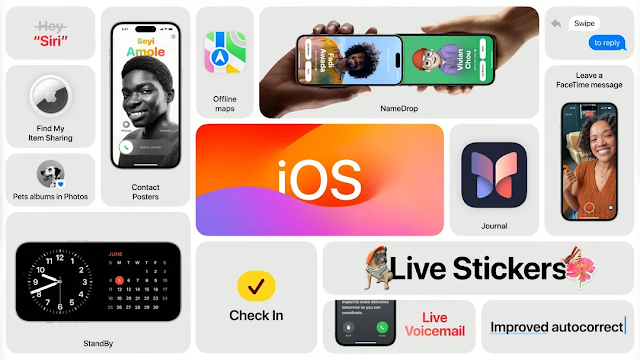
Apple’s latest version of its OS ‘iOS 17’ is being launched with new features including messaging updates, Airdrop updates, enhanced autocorrect, a new app ‘Journal,’ and more.


One of the most significant additions to the Messages app is transcriptions of voice messages that let users view transcripts of the messages that callers leave them, in real time. Another feature called Check In automatically sends a message containing a user’s live location, phone’s battery and cell service status to a friend in case of emergency. Additionally, users will be able to add emojis or photo cutouts as Stickers in messages, convert live photos to animated stickers, as well as add effects to stickers. Other messaging updates include improved search filters and the ability to easily catch up with the most recent chat.


Airdrop in iOS 17 will have a new feature called NameDrop via which, it is possible to send selected email addresses, phone numbers, as well as Photos by simply bringing two iPhones or an iPhone and Apple Watch near each other. In addition to that, users will be able to AirDrop big files while being out of range as the files download.

Apple is Releasing iOS 17 Featuring a New App ‘Journal,’ Improved Autocorrect and More


After taking into account feedback from members of disability communities, Apple has created new tools for improved accessibility for its devices. These have been designed to specifically facilitate those with speech, hearing, vision, and cognitive impairments. Among the features that Apple has previewed, the one that stands out the most is called Personal Voice, designed for people who may lose their ability to speak. It allows such users to create their own synthesized voice that resembles their own, that they can then use to talk to family and friends.


Users will be able to create their Personal Voice by reading out loud a list of text prompts for 15 minutes on audio on their iPhone or iPad. Together with the Live Speech feature, Personal Voice will be able to communicate with others by reading out the text typed by the user in Live Speech.


Another functionality, called Assistive Access, is created for people with cognitive disabilities. It streamlines Apple’s core apps to provide a non-overwhelming app experience to users by filtering out just the essential features of the apps. For example, it could highlight high contrast buttons or show large text labels. The apps that Assistive Access provides modified versions of include Phone, FaceTime, Messages, Camera, Photos, and Music.

Apple Previews Features for Improved Accessibility for Users with Speech, Hearing, Vision, and Cognitive Impairments


YouTube is providing its Premium subscribers with an enhanced version of the 1080p HD video quality. It is meant to make videos that are heavy on detail and motion appear sharper. YouTube further clarified that the feature won’t be available for all videos, including Shorts, livestreams, and videos at resolutions higher or lower than 1080p.


While it may be hard to distinguish the regular 1080p resolution from 1080p Premium, the difference is technically in the latter being able to pack more information per pixel.

YouTube Announces New Perks for Premium Subscribers, Including More Enhanced 1080p Video Quality


A while back, Microsoft launched its Phone Link app for iOS that makes it possible to send and receive messages and calls via iMessage on Windows PC.


The way Phone Link works for iOS is that it sends and receives messages over Bluetooth. Apple then detects these messages and forces them to be sent and received via iMessage. Additionally, iPhone users can view and dismiss notifications on the Phone Link app. The app, however, doesn’t support other functions like mirroring phone display, running other apps, or interacting with group chats.


To set up a connection between an iPhone device and PC, you will be prompted to scan a QR code from your phone which will open an App Clip version of Phone Link and start the Bluetooth pairing process. Once the pairing is complete, you can then enable contact sharing by turning on “show notifications.” This will allow system notifications to be shared to your PC via Bluetooth.

Microsoft’s Phone Link App Can Now be Paired with iPhone on Windows 11


Microsoft is updating its Phone Link app to support iOS’ iMessage service, including making and receiving calls and messages, as well as viewing phone notifications; all within Windows 11.


iPhone users can connect their devices to a Windows laptop or PC via a Bluetooth connection, then access Phone Link to use iMessage. Through this functionality, one can message contacts that also have iPhones directly from their PC. However, this excludes the ability to send pictures as messages and interact in group chats.


iMessage conversations in Phone Link appear in a simplified format where only messages that have been exchanged using Phone Link are displayed. This means that users can not view their complete message history in the app. Moreover, there are no blue ticks and green bubbles as in the original iMessage format.

Microsoft is Testing an iMessage Integration in its Phone Link App


Microsoft’s AI chatbot Bing is being launched in a mobile app version for both iOS and Android. The functionality will work pretty much the same way as an app as it does on web.


After launching the revamped Bing two weeks ago, Microsoft quickly began receiving criticism from users over the bot responding with incorrect information and even insults. This led to updates including limited number of replies from the bot, and the option to choose from a variety of its tones.

Microsoft’s Digital Assistant ‘Bing’ is Now Available as an App and Skype Integration


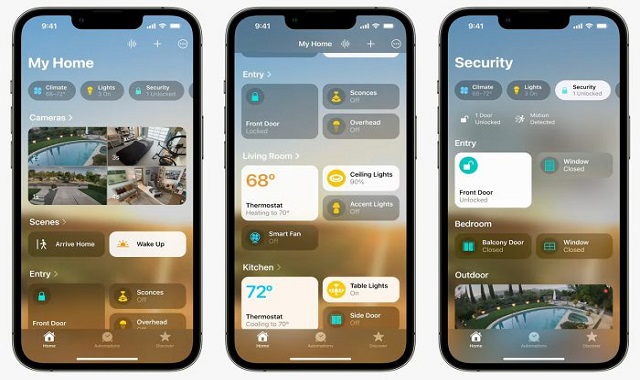
Apple’s new Home app that made its debut in beta in iOS 16.2 back in October, can no longer be upgraded, some users report. The Home app’s upgrade did not run automatically unlike other iOS apps but had to be manually processed from the settings.


The removal of the upgrade option seems to have happened after several problems were identified within the app after Apple launched the upgrade.

Apple Pulls Back Home App Upgrade in iOS 16.2


As per the EU’s Digital Markets Act (DMA), a new rule will require digital gatekeepers to ensure open markets in Europe. What this means for tech giant Apple is that it will begin allowing its users to install alternative app stores on iOS in the region; which is something that Apple has never before done, as it has only allowed access to its native App store on its devices.


Passing of the EU’s DMA law would also mean that Apple will have to allow installing of software downloaded from the web as well, which is what the company’s executives have previously termed as “a cybercriminal’s best friend.”

Apple Will Have to Allow Third-Party App Stores on iOS Devices in Response to Upcoming EU Law


After Elon Musk announced and launched the $8 plan for Twitter Blue last month, the decision was taken back as the plan was suspended just a few days later. However, to our surprise, the $8 verification is going into effect once again and this time, with a major change that is probably more disappointing than the original decision.


The tweak has to do with the subscription’s price, which is now at $11 for iOS users, while the cost remains the same for web users. There is a reason behind it, and that is Apple’s 30% in-app payment policy that Twitter has decided to simply pass on to the subscribers instead of working out another alternative.


Twitter is Relaunching its $8 Twitter Blue Subscription with an Altered Price for iOS


Twitter is testing a new option for Spaces that allows creating audio clips of up to 30 seconds from your audio broadcasts in the app.


Basically, you will be able to clip the audio files to create short audio clips which you can then share within Tweets along with the links to the full audios. This will help users enhance content creation and also boost sharing from audio broadcasts.  


Twitter is Testing a New Content Creation Tool for Spaces


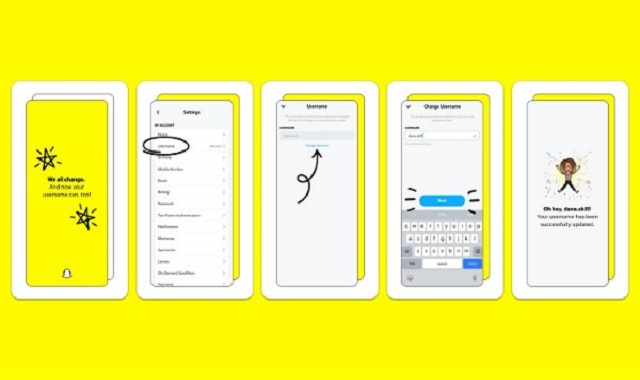
Snapchat has announced an important update: you can now change your username in the app. Moreover, doing so would not cause any damage to your friends' list, Snap code, Snap score, Memories, or other data for that matter.


The update will be available to users on iOS and Android starting from February 23.


This would be delightful news for many users, as a lot of us may have set up our Snapchat usernames a long time ago, which we may now be ashamed of. Or perhaps, there may be some who want to change their username just for fun, or because they may have gotten bored of their existing username.

Snapchat Finally Allows Users to Change their Usernames in the App


Twitter has released a new update for Direct Messaging that would be helpful to users: the ability to pin chats. You can now pin up to six chats at once to the top of your inbox. In that way, you can keep track of your important or favorite conversations.


You can access the new option by swiping to the right on any chat that you want to pin. Once you have pinned a chat, it will remain on the top even if new messages from other chats come in.

Twitter’s Latest DM Tool Lets You Pin Chats


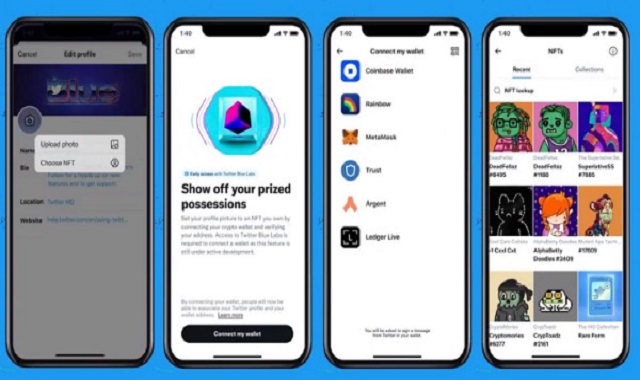
After testing the new NFT profile picture display feature for the past few months, Twitter is now releasing the option for Twitter Blue subscribers on iOS. The company plans to roll the feature out to all users later.


As a Twitter Blue subscriber, your NFT image will be linked directly to your ownership data on OpenSea. Only actual owners of the NFT profiles will have their images displayed in the new hexagonal format with official links. Additionally, the links will help reduce unauthorized use of the images.


According to Twitter, the new feature “provides a seamless, user-friendly way for people on Twitter to verify their NFT ownership”

NFT Profile Picture Option on Twitter is Now Available to Twitter Blue Users


WhatsApp is lately working on a new feature that enables users to edit their recipients list before sending media to contacts and groups.


By editing the recipients list, users can choose their recipients to send media content to. Additionally, changing recipient settings for chats may also be applied for Status update.

WhatsApp is Creating a New 'Edit Recipients' Option


Appfigures has released statistics of this year’s most downloaded apps on both Google Play and App Store combined. With little surprise, it is TikTok that has made it to the top of the list. The app had 586 million new downloads in 2021 and fought a close competition with rival app Instagram that came second with 566 million downloads.


Instagram’s parent company, Meta, won two more spots with Facebook and WhatsApp ranked 3rd and 4th in the list.


Messaging app Telegram also made it to the top 5 with 365 million new users. As for the top 10 rankings, apps including Snapchat, Messenger, Zoom, CapCut, and Google Meet have secured their spots.


In addition to the ranks, there is something more interesting to notice here: five of the top 10 apps are designed for creators, including CapCut, which is TikTok’s video editing app.


YouTube, another highly popular creator-focused app, could have been part of the top 10 category as well, but it couldn’t be added as the app comes built-in on Android devices, hence making it difficult to estimate its number of new downloads. On the App Store, however, YouTube can be seen securing the second spot with 127 million downloads.

Take a Look at the Most Downloaded Apps of 2021


Twitter recently announced that it is now introducing auto captions for all videos uploaded within tweets on both iOS and Android.


On the app version, captions will be generated for muted videos within tweets, whereas on the desktop version, users will have the option to turn the captions on or off for the videos, by tapping the CC button.


The auto captions for videos are available in 37 languages and the captions on each user’s device will be displayed in the language that is set on the device.


In addition to this, Twitter is working on translation as well as editing options for the auto captions.

Twitter is expanding Auto captions to All Video Content within Tweets

Subscribe Our Newsletter