Visualistan: Pictures -->

    Social Items


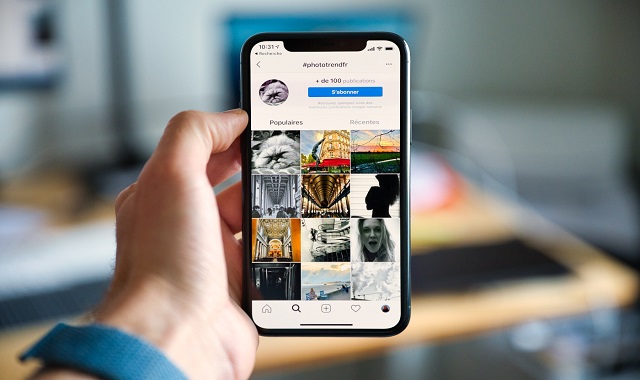
In a recent QnA session with Instagram users, Instagram chief Adam Mosseri revealed in a Story that the company plans to make photos a key focus on the app once again, as it had been overfocusing on video content in the past year.


Mosseri added that there will be a balance between how often users get likes and comments on photos versus videos. This sounds like good news for users who weren’t happy with an overflow of videos in the app, especially Reels, which have been getting more attention including likes and comments. Instagram thus kind of transformed into a TikTok-like app.


Instagram to Start Focusing More on Photos


Facebook is taking down the functionality of using videos for profile display starting from the 7th of February. Users who have videos displayed in place of their profile images will have them reverted to photos, as per Facebook’s announcement.


Facebook has released a notification to its users, related to the update which informs them that if they don’t replace their video displays with photos, the cover images of their videos will automatically turn to their profile images instead.

Facebook is Removing the Option of Uploading Videos as Profile Displays


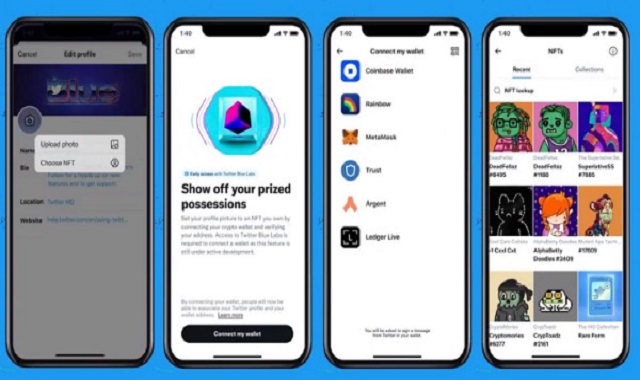
After testing the new NFT profile picture display feature for the past few months, Twitter is now releasing the option for Twitter Blue subscribers on iOS. The company plans to roll the feature out to all users later.


As a Twitter Blue subscriber, your NFT image will be linked directly to your ownership data on OpenSea. Only actual owners of the NFT profiles will have their images displayed in the new hexagonal format with official links. Additionally, the links will help reduce unauthorized use of the images.


According to Twitter, the new feature “provides a seamless, user-friendly way for people on Twitter to verify their NFT ownership”

NFT Profile Picture Option on Twitter is Now Available to Twitter Blue Users


Twitter is testing its new NFT profile picture option, which is visible to some users now. NFT trading is a process of transaction of digital goods. On Twitter, NFT profile images are displayed in a hexagonal format and include the link to NFTs listing on a blockchain, which gives evidence for ownership.


With the growing popularity of NFT profile pictures, Twitter has been becoming an NFT discussion hub and has decided to play its part by building an official integration process that lets users display their NFT ownership.


The linkage to each NFT’s official information will let users see more information about each NFT by tapping on it. It will open a listing of both the owner and creator, as listed on the chain. Moreover, only owners of the NFT profile pictures will have access to the original hexagonal format of the images, hence reducing unapproved use of the images.


Twitter Introduces NFT Profile Display Option to Some Users


Twitter just announced that it is working on edge-to-edge media in tweets for its iOS version. This layout will provide users with a full screen experience of videos and photos in their Twitter timeline, which closely resembles the layout of Instagram.


Twitter also explained the purpose behind the design of the new look, which is to enhance both visual and text-based conversations on the platform. The feature also fixes the issue of cropped images in conversations; something that Twitter users have always complained of.


On the other hand, some users don’t seem to be quite content with the social company’s new design layout. Some concerns suggest that the edge-to-edge screenshots of tweets can cause confusion, as people may take them for actual tweets.

Twitter is Testing a New Layout with Edge-to-Edge Picture and Video


The Pixel line-up comes with a hack, with which you can select text and images from the Overview screen and copy or share it. It was introduced more than 3 years ago and works for apps that don’t enable you to select text or images to copy. Google has improved the feature over time and has recently made a new addition to it to help detect an image.


In Android 12's latest beta 4 running on your Pixel device, the Overview will show a new purple icon on the bottom left of recognized images. This is an indicator that Google has detected an image, which means that you don’t need to manually recognize the image by tapping and holding it.

Overview in Android 12 on Pixel Gets a New Image Detection Feature


Google has been leading the world of technology in the 21st century and has managed to even get ahead of Apple and Microsoft, two of the tech giants. While Google has achieved great milestones, it overlooked one simple and essential feature that was missing in its Chrome browser: the option to take a screenshot.


Now developers at Google are reportedly working on building the screenshot feature. However, some Reddit users pointed out that the option to take a screenshot already exists in Chrome, except that it’s hiding in the developer’s area and is inaccessible to users. Moreover, it is quite basic in terms of its functionality as it does not offer tools to edit the snapshot taken.

Google Realizes it Has Been Missing a Screenshot Option in Chrome


WhatsApp has released its Android beta version 2.21.14.16. The update includes image quality setting, which offers three options for photo upload quality: Auto, Best quality, and Data saver. The company had launched the same setting for videos earlier in its previous version.

WhatsApp’s Latest Android Beta Version Includes Settings for Image Quality

Twitter rolls out its support for larger image previews

One of the giant news sharing platforms, Twitter announced that the platform will be now supporting larger image previews in the timeline. Now stop cropping out every picture to make it to the size of Twitter and upload any image easily regardless of its size.

The tests for larger image previews were being done since March for both the iOS and Android devices and has now released the new update for both users.

Twitter rolls out its support for larger image previews

Google photos turn on subscription for advanced Photo Editing features

Google has decided to provide its users with better and creative features for their photos stored in Google Photos. Until now, Google photos were only stocked with a few standard editing features like Color Pop, Portrait Light, or Portrait Blur and 15GB storage space, but now the company has decided to take a step further into the AI and enhance these tools to a better level. Google has announced the addition of paywalled features to the Google photos but only for those who have already subscribed to Google One.

Google photos turn on subscription for advanced Photo Editing features

Google is all set to bring 3D picture effect for its users

The latest announcement by Google promises a brilliant 3D picture effect to your photos, that too, for free. On Tuesday of this week, the popular company declared in a blog that the new feature is manufactured in such a way that it will be able to turn a two-dimensional image into a three-dimensional image. The company also says that to enable this feature, the user will not have to go to unnecessary lengths, but instead, the Google Photos application will automatically do the magic on the 2D images present in your album and place them in the recent Highlights. 

Google is all set to bring 3D picture effect for its users


Google Photos is now letting users of iOS devices sync their liked and favorite photos with Apple Photos on iOS devices. This functionality is likely to ease the previous struggle of utilizing Google Photos on iOS due to restrictions imposed by Apple.


Google Photos will provide a toggle with which you can sync your ‘’liked’’ or ‘’favorite’’ photos from Apple photos when backing up your photo library. The option will also be useful if you are using multiple Apple devices, as it will help save images on all the devices.

Google is Allowing Photo Syncing of Apple Photos with Google Photos

Subscribe Our Newsletter