Visualistan -->

    Social Items

Travel Study Exposes Gap Between Language Anxiety and Learning

Most travelers agree that they should learn a few words of the local language before a trip, but far fewer actually do it. According to Preply’s newly released data, 80% of responding Americans said learning the language is important, 58% follow through, and 40% cram on the plane.

Learning a language for travel doesn’t have to be time-consuming. Learning local greetings, please and thank you, and “do you speak English?” will cover most of your necessary interactions with locals. Travelers could learn these phrases in a weekend!

Travel Study Exposes Gap Between Language Anxiety and Learning

Digital invoice workflow showing invoice templates, approval steps, eSignature, and document archiving on a computer screen.

Invoices may look like simple billing documents, but they often sit at the end of a much larger business process. A service has been completed, work has been approved, payment terms have been agreed, and someone now needs to issue an accurate document that can be reviewed, accepted, and stored. Using consistent Invoice Templates can make that process easier by giving businesses a repeatable structure instead of rebuilding every invoice from scratch.


This becomes particularly useful when invoices form part of a digital document workflow. Rather than treating billing, approval, electronic signatures, and recordkeeping as separate activities, businesses can manage them as connected steps. For freelancers and small companies, this can reduce repetitive administration, while larger teams benefit from more consistent documents and clearer approval records.


Why Standardized Invoice Templates Matter


The obvious benefit of an invoice template is that nobody has to recreate the same layout every time a bill is issued. In practice, though, consistency matters just as much as speed.


When several employees prepare invoices independently, small differences quickly appear. One person places payment terms at the top, another adds them at the bottom, while somebody else may forget a reference number entirely. A standard template gives everyone the same starting point.


Business details, customer information, invoice numbers, dates, line items, totals, payment terms, and internal references can all appear in predictable places. That makes invoices easier for both the sender and recipient to review. It is particularly useful for consultants, contractors, agencies, property businesses, professional services firms, and finance departments that issue similar documents regularly.

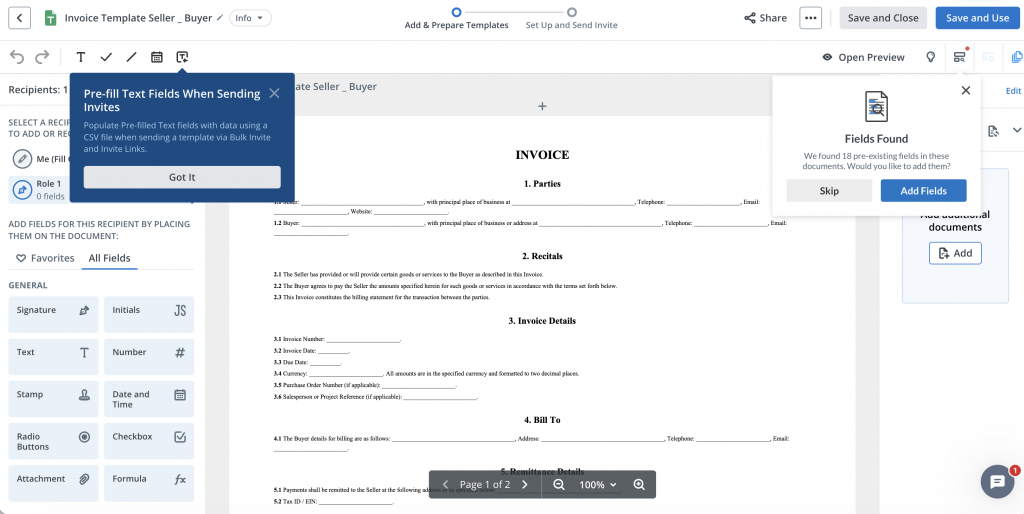
signNow invoice template editor showing an invoice with text, date and electronic signature fields
An invoice being prepared in the signNow editor with fillable document fields.

Moving From a Static Invoice to a Digital Workflow


Creating the invoice is only one part of the process. In many businesses, the document also needs to be checked internally, connected to completed work, approved by a manager, or retained alongside other signed records.


Consider a contractor carrying out maintenance work for a commercial property company. The contractor sends an invoice, but before finance can process it, the property manager needs to confirm that the work was actually completed. In another business, a department manager may need to approve an invoice before accounts payable releases payment.


When everything happens through ordinary email attachments, it is easy to end up with several versions of the same file.


A digital document workflow gives those steps a clearer structure. The invoice can be prepared consistently, routed to the relevant person where approval is required, and retained electronically once complete.


Not every invoice needs a signature. The useful question is whether there is a genuine approval, acknowledgement, or documentation requirement. eSignature should simplify that process rather than create an additional step for its own sake.


Where eSignatures Add Practical Value


Electronic signatures are most useful when a business needs documented agreement rather than simply sending information.


A professional services company, for example, might issue an invoice after completing an agreed project milestone. A contractor may need confirmation that a stage of work has been accepted. In real estate, maintenance or property-service invoices can pass through a property manager before reaching finance.


Healthcare organizations may also deal with documents that require controlled handling and approval. According to the verified information supplied for signNow, HIPAA support is available where a Business Associate Agreement is required.


The same principle applies in legal, finance, and HR environments. The value is not simply the ability to place an electronic signature on a page. It is having a defined record of who was expected to review, approve, or sign a document as it moved through the business.


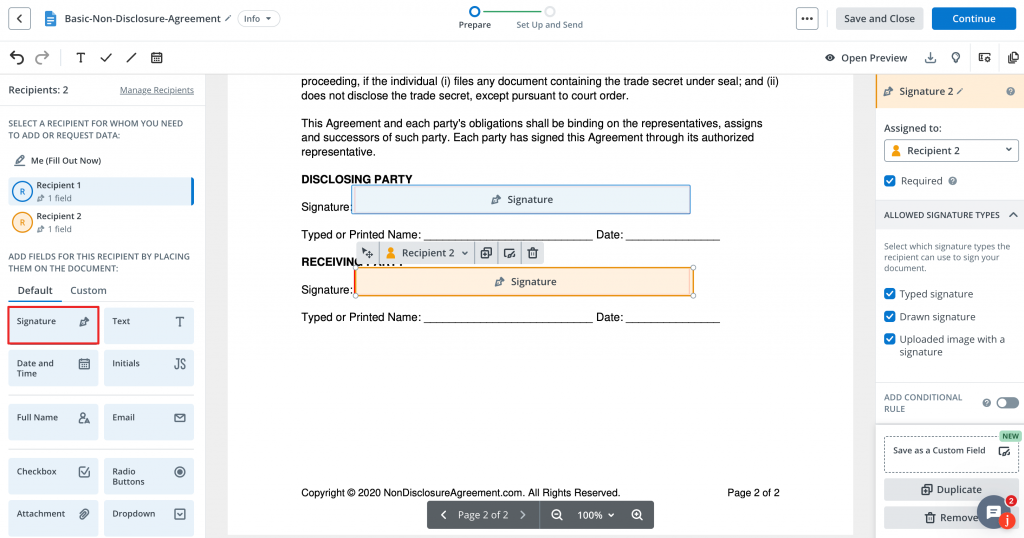
signNow document editor showing electronic signature fields assigned to different recipients
Signature fields can be assigned to specific recipients before a document is sent for eSignature.

What a Good Digital Invoice Process Looks Like


A reliable invoice workflow starts with accurate information, not with software.


Before an invoice is sent, the person preparing it should check the customer details, invoice number, invoice date, due date, description of goods or services, individual charges, total amount, and payment terms.


After that, the business should decide whether anybody needs to approve the document before it reaches the customer. For a freelancer, the process may simply involve preparing the invoice, checking it, sending it, and keeping the final copy.


For a larger organization, there may be additional stages involving project managers, department heads, procurement, or finance.


The aim should be one understandable process rather than several disconnected copies moving through inboxes and local folders. A document should move logically from preparation through any required approval, then to its recipient and finally into the organization's records.


Using Templates for Recurring Client Work


Templates become especially useful when a company bills the same customers repeatedly.


Take a marketing agency working with ten retained clients. The general structure of each invoice may remain almost identical every month while dates, project descriptions, hours, or charges change. Rebuilding that layout each time adds little value.


The same applies to a self-employed consultant, a maintenance company serving several properties, or a professional practice billing for recurring services.


The stable parts of the invoice can remain in place while transaction-specific details are updated. That also reduces accidental formatting changes and makes it less likely that somebody will leave out a standard field.


Clients benefit as well. When invoices follow a familiar structure, recipients know where to find totals, payment terms, invoice numbers, and reference information without having to interpret a new layout every time.


Security and Compliance in Electronic Document Workflows


Invoices often contain more information than people realize. They may include names, addresses, transaction details, payment terms, customer references, internal identifiers, and commercially sensitive information.


For that reason, moving invoices and related approval documents online should involve appropriate security controls.


Based on the verified information supplied for this article, signNow uses TLS 1.2 and TLS 1.3 for data in transit and AES-256 encryption for data at rest. The service also provides audit trails and two-factor authentication.


Its listed compliance coverage includes ESIGN, UETA, HIPAA where a BAA is required, SOC 2 Type II, GDPR, 21 CFR Part 11, PCI DSS, ISO 27001, CCPA, and eIDAS.


For U.S. businesses using electronic signatures, the ESIGN Act and UETA are particularly relevant legal frameworks. Organizations should still assess their own industry requirements and document-handling obligations rather than assuming that one compliance label covers every possible use case.


How Different Industries Use Digital Document Workflows


Real Estate


Property businesses regularly coordinate documents between landlords, tenants, contractors, property managers, and finance teams. A contractor invoice may need confirmation from the property manager before it can be processed. Keeping that approval within a structured electronic workflow makes it easier to identify the final approved version later.


Healthcare


Healthcare organizations have additional concerns around privacy and controlled access to documents. Where relevant, signNow supports HIPAA with a BAA required. Healthcare businesses still need to consider what information appears in each document and how their own internal procedures meet applicable requirements.


Finance


Finance teams tend to place particular importance on authorization and traceability. A clear document workflow makes it easier to understand who prepared a document, who reviewed it, and whether an approval step was completed before processing.


Legal Services


Legal practices may use invoices alongside engagement documents, approvals, or other client records. Keeping documents electronic can reduce unnecessary printing and scanning while providing a more organized record of the transaction.


HR


HR teams may not issue customer invoices, but they manage similar document processes every day. Onboarding forms, acknowledgements, internal approvals, and employment documents benefit from the same approach: consistent templates, clearly assigned responsibilities, secure handling, and an identifiable final version.


Reducing Administrative Work Without Losing Control


Digital workflows are most useful when they remove repetitive work without removing sensible checks.


There is little benefit in speeding up invoice creation if employees then spend time correcting missing information or trying to work out which attachment is the approved version.


According to the verified figures provided for signNow, users can save up to six hours per employee each week. The reported document completion rate is 80%, while signNow reports an average first-year ROI of 700%.


Those numbers should be considered in context rather than treated as guaranteed results for every business. The actual benefit will depend on document volume, the existing process, team size, and how extensively electronic workflows are used.


The wider lesson is that templates, approval responsibilities, eSign steps, and document storage work best when they are designed together rather than introduced as unrelated tools.


Why Audit Trails Matter


One of the practical advantages of a structured digital workflow is having a clearer history of what happened to a document.


This becomes useful when somebody asks a straightforward question months later: “Was this approved?”


With an informal email process, answering that question can involve searching several inboxes and comparing multiple attachments.


signNow includes audit trails among its verified security features. An audit trail supports recordkeeping by providing a history associated with the electronic document process.


It does not replace good internal controls, but it can make document activity easier to follow. If a contractor's invoice is connected to an approval or signed acknowledgement, retaining that information as part of the transaction can provide much more context than storing an isolated invoice file.


Managing Multi-Person Approval Workflows


Some invoices are simple, while others need to pass through several people before they are ready for processing.


A service provider might send a document to a project manager first, followed by an approver or finance contact. An HR document may need a manager's approval before reaching an employee. The exact workflow varies, but the underlying problem is the same: everyone needs to know when it is their turn to act.


A defined recipient order helps reduce manual forwarding and makes responsibilities clearer. This is particularly useful when the same approval sequence is repeated regularly.


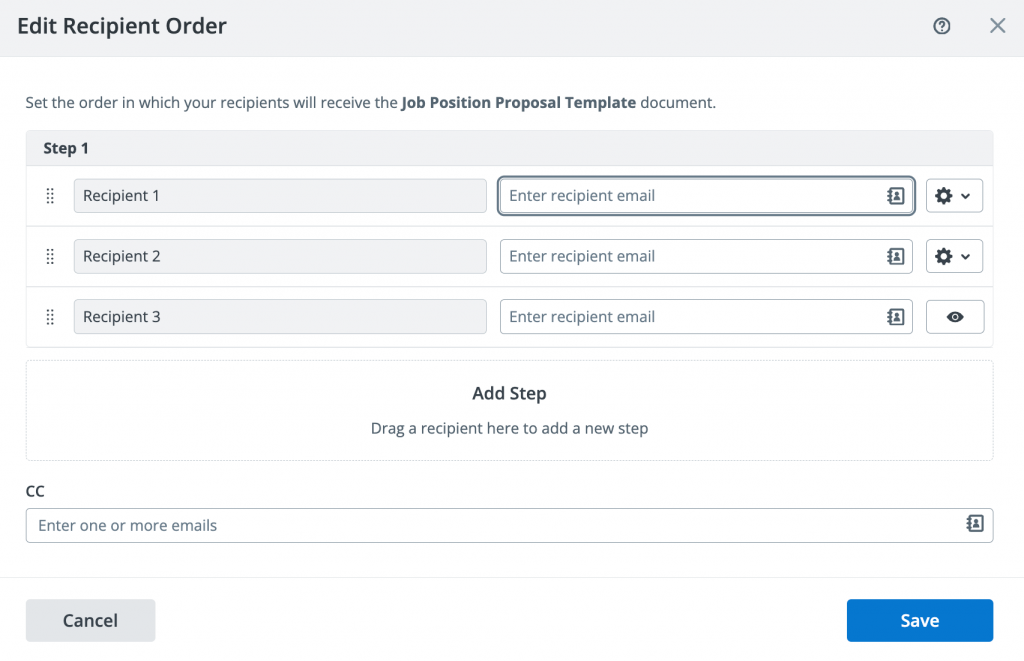
signNow Edit Recipient Order window showing several recipients and sequential document routing
signNow's recipient-order interface can be used to organize documents that need to move through several people.

Cost Considerations for Growing Teams


Document software costs can become more noticeable as the number of people using a system increases. That is why pricing should be considered alongside the actual workflow rather than judged only by the headline subscription figure.


Based on the pricing information provided for this article, signNow's Business plan starts at $8 per user per month when billed annually.


The supplied information also states that paid plans allow unlimited users and that signNow does not impose an envelope cap, compared with DocuSign's limit of 100 envelopes per user per year.


The more important question is how many people actually need access and how frequently they send documents. A lower price offers little benefit if the service does not fit the company's process. Equally, paying for unnecessary complexity can make a straightforward workflow harder rather than easier.


Building a Workflow People Will Actually Use


The most effective document process is usually the one employees can understand without having to read a lengthy manual.


Templates should be clear, fields should appear in a logical order, and responsibilities should be obvious. Employees should know who prepares a document, who approves it, who receives it, and where the completed version belongs.


Invoice workflows are a useful place to start because the process is familiar. Prepare the document, check the figures, obtain any necessary approval, send it to the relevant recipient, and retain the final version.


Once that process works consistently, the same approach can be applied to agreements, onboarding documents, authorization forms, and other records requiring electronic completion.


Technology is only part of the improvement. Much of the value comes from removing uncertainty around which template to use, who needs to act next, and which version should be treated as final.


Final Thoughts


Invoice templates solve a very ordinary business problem: the same type of document needs to be created repeatedly without introducing new errors each time.


Their value increases when they sit inside a sensible digital document workflow.


For simple transactions, that may mean creating an accurate invoice from a standard structure and keeping the final copy in the right place. For more involved transactions, the process may also include internal approval, eSignature, or documented acknowledgement.


The goal should not be to digitize every possible step simply because the technology exists. Businesses should focus on the points where employees repeatedly enter the same information, create duplicate files, chase approvals, or struggle to locate the final version.


That is where standard templates and electronic document workflows tend to provide the most practical benefit.


Frequently Asked Questions


What is an invoice template?


An invoice template is a reusable document structure containing the standard sections needed for billing. Instead of designing every invoice from scratch, a business keeps the layout consistent and changes details such as the client, invoice number, dates, goods or services, charges, and payment terms.


Does an invoice need an electronic signature?


Not necessarily. Many invoices are simply requests for payment and do not require signatures. An eSignature can be useful when an invoice is connected to approval, acknowledgement, work completion, or another process where the business needs a clearer documented record of agreement.


Are electronic signatures legally recognized in the United States?


Electronic signatures are generally recognized under the federal ESIGN Act, while UETA provides an important state-level framework for electronic transactions. The exact requirements can vary depending on the type of document, the parties involved, the industry, and other applicable legal obligations.


What information should an invoice template contain?


A practical invoice normally includes the seller and customer details, invoice number, invoice and due dates, a description of the goods or services supplied, relevant charges, the total amount due, and payment terms. Some businesses may require additional information based on their industry or internal procedures.


Why use an invoice template instead of creating every invoice separately?


A template keeps the document structure consistent and reduces repetitive formatting. It can also reduce the chance of staff forgetting commonly used fields. Templates are particularly useful for freelancers, contractors, agencies, professional services firms, and finance teams issuing similar invoices regularly.


How does an audit trail help with electronic documents?


An audit trail provides a record associated with activity on an electronic document. This can make it easier to understand what happened during an approval or signing process instead of relying only on email history. signNow includes audit trails among its verified security features.

How Invoice Templates Fit Into a More Efficient Digital Document Workflow

The Most Affordable U.S. Metros for Young People Starting Out #Infographic

If you’re deciding where to move after you graduate, Rove Lab’s new study can give you a framework for deciding, plus plenty of tips on what to look for and how to apply them to a successful move.

Check the rent-to-income ratio. The standard advice is to keep housing costs under 30% of your income. Pittsburgh has a 17.6% average rent-to-income ratio, Toledo has 18.2%, and Cleveland has 18.3%, so they all easily meet that guideline. Las Vegas, at 30.9%, does not.

Don’t stop at considering rent costs. Consider the cost of living, too. Wichita’s average rent of $1,010 a month looks pretty good on paper, but with a cost of living that’s 11.05% below the national average, you’re saving a lot of money. 

The Most Affordable U.S. Metros for Young People Starting Out #Infographic

Map showing the top 10 U.S. states with the most attractive accents according to Preply’s 2026 survey

American accents can vary dramatically from one region to another, shaping how people communicate, connect, and identify with where they come from. Preply surveyed 2,551 Americans to explore which regional accents are considered the most attractive, which slang terms cause the most confusion, and how regional speech may be changing across the United States.

American Accents and Slang Report 2026: The Most Attractive Regional Voices in the U.S.

Top industries contributing to U.S. GDP, including real estate, manufacturing, finance and healthcare

Which industries contribute the most to the U.S. economy? This infographic ranks the top industries contributing to U.S. GDP in 2024. Real estate and rental and leasing leads with 13.8% of GDP, followed by manufacturing at 9.8% and professional, scientific and technical services at 8.0%.

Top Industries Contributing to U.S. GDP in 2024

Header graphic showing the most popular college degrees ranked by return on investment after five years in the workforce, led by aviation.

Choosing the right college degree can have a major impact on both career opportunities and long-term financial returns. While tuition costs continue to rise, some fields of study offer a significantly stronger return on investment once graduates enter the workforce.

This infographic compares some of the most popular college degrees based on their estimated return on investment after five years in the workforce. It highlights how degrees in areas such as aviation, engineering, computer science, nursing, mathematics, accounting and other popular subjects perform when education costs are compared with potential earnings.

Best College Degrees for ROI After 5 Years in the Workforce (2026)

Small business cybersecurity illustration featuring a digital security shield and padlock representing essential protection for business accounts, devices and data.

Cybersecurity can feel complicated and expensive for small businesses, but effective protection doesn’t always require enterprise-level tools. From multi-factor authentication and strong passwords to regular backups, phishing awareness and secure Wi-Fi, a few practical security measures can significantly strengthen everyday business protection.

Small Business Cybersecurity: Essential Protections You Need (and What You Can Skip)

Header graphic with bold black text on a light grey background reading, “How have the top 25 most popular college majors changed over time?” Smaller text says, “Based on an analysis of 105,623 undergraduate student loan applications submitted from 2018 to 2026.

Student Choice’s 2026 new report tracks where students are applying their tuition dollars by ranking majors by popularity. This data tells us a lot about what students are thinking and seeing about the current job market.

Data Shows the Most Popular Majors of 2026

Public domain characters timeline showing famous fictional characters expected to become available for creators from 2027 to 2037

For writers, animators, game developers and independent creators, the public domain can open the door to new creative possibilities. When the copyright term for a work expires, certain versions of characters and stories may become available for reuse, adaptation and reinterpretation.

This infographic from PixlParade maps out famous fictional characters that are expected to enter the public domain over the next decade, from 2027 to 2037. The timeline includes well-known names from animation, books, comics and classic films.

Some of the most interesting entries include Pluto and Babar the Elephant in 2027, King Kong in 2029, Donald Duck and Goofy in 2030, and Porky Pig in 2031. The 2030s also bring major literary, film and comic book milestones.

According to the timeline, 2033 is expected to include characters from The Hobbit, such as Bilbo Baggins, Gandalf and Gollum, along with Disney’s Snow White film version and Daffy Duck. Superman is expected to follow in 2034, Batman in 2035, and Wonder Woman in 2037.

For indie creators, these dates are exciting because public domain works can inspire new books, films, games, comics and artwork. However, public domain use is not always simple. The specific version of a character matters, and trademark rights may still apply even after copyright protection expires.

For example, a character’s earliest version may become public domain before later designs, story details or branding. That means creators should always check the exact version, publication history and legal limits before using a famous character in a commercial project.

Take a look at the infographic below for a visual guide to the characters expected to enter the public domain between 2027 and 2037.

A Guide to Characters Entering the Public Domain Over the Next Decade

infographic by: pixlparade.com

Share This Infographic On Your Site

A Guide to Characters Entering the Public Domain Over the Next Decade

Where you’ll find the best digital infrastructures infographic showing leading countries for connectivity, innovation, digital services and online business opportunities
Strong digital infrastructure has become one of the biggest signs of a modern economy. From high-speed internet and cloud systems to online government services and reliable data transfer, the countries that invest in digital connectivity are often better prepared for business, remote work, online education and everyday digital life.

This infographic from Ooma looks at which countries invest the most in digital infrastructure, using a range of indicators connected to technology investment, broadband access, venture capital, ICT patents, machine-to-machine connectivity and digitally deliverable services.

According to the ranking, Sweden takes the top spot, followed by Israel, South Korea, Estonia and the United States. These countries stand out for different reasons, including strong broadband networks, high levels of research spending, digital public services, venture capital investment and advanced technology sectors.

Where You’ll Find the Best Digital Infrastructures Around the World

UK exports to the Netherlands 2026 snapshot showing trade routes, shipping, key export sectors and UK Netherlands business trade data
The Netherlands continues to be one of the most important export markets for UK businesses, acting not only as a major buyer of British goods but also as a key gateway into wider European trade.

This infographic gives a quick 2026 snapshot of UK exports to the Netherlands, highlighting the country’s position as the UK’s 4th largest export destination. It also shows that the Netherlands accounts for 5.8% of total UK exports, with UK exports valued at around £52 billion in the year to Q1 2025.

Some of the strongest UK export sectors to the Netherlands include crude oil, refined oil, pharmaceuticals, natural gas and vehicles. These categories show how broad the trade relationship is, covering energy, healthcare, manufacturing and transport-related industries.

For UK companies looking to expand into Europe, the Netherlands is often seen as a practical starting point. Its well-established trade routes, strong logistics network and clear export processes make it an attractive market for exporters of different sizes.

The infographic also highlights why export documentation and customs compliance remain important for businesses trading with the Netherlands. Having the right documents in place can help avoid delays, reduce risk and make international trade smoother.

Created by ExportDocuments.co.uk – specialists in UK export documentation and customs compliance support.

Learn more about UK export documentation and customs requirements at:
https://www.exportdocuments.co.uk/


UK exports to the Netherlands 2026 snapshot showing trade value, top export sectors and key UK Netherlands trade data

UK Exports to the Netherlands in 2026: Trade Snapshot and Top Sectors

Why Your Roof Is Pivotal For Your Insurance Premiums

When it comes to insurance premiums, they seem to only go up in recent years. For commercial buildings specifically, monthly premiums have grown at an annual compounded rate of 8.7%. This means that the monthly cost for insurance for these types of buildings could be $4,890 by 2030. Fortunately, there are some ways to keep insurance premiums low.

Why Your Roof Is Pivotal For Your Insurance Premiums

Subscribe Our Newsletter