Visualistan: Android -->

    Social Items


Microsoft has launched its AI assistant Copilot as a standalone app on Android, following the rebrand of Bing Chat to Copilot. The Copilot app is capable of functioning without the Bing mobile app and has reportedly been available on the Google Play Store for a week now.


The Android version of Copilot works pretty much like ChatGPT; users can ask the bot questions, as well as use it to generate images and produce content. The image generation in Copilot is powered by DALL-E 3, while its content generation function can be used to draft long texts such as emails and documents.


Microsoft’s AI Assistant Copilot Makes it to Android as an App


The new Android iMessage app ‘Beeper Mini’ that became the first and only easy solution for Android users to communicate with Apple users via iMessage, recently started experiencing technical problems in just less than a week since its launch. More and more users started reporting being unable to send and receive their iMessages in the app. It is speculated that Apple may be responsible for Beeper Mini’s dysfunction.


Beeper Mini was developed as a result of massive efforts that went into figuring out the entire process of how to register a phone number with iMessage, send messages directly to Apple’s servers, and have messages sent back to the device natively inside the app. The toughest part of it, according to CEO of Beeper Mini, Eric Migicovsky, was cracking Apple’s code that detects if the connected device is a legitimate Apple product.

Apple Might Have Stopped the Android App for iMessages from Working


Google’s gaming service ‘Google Play Games,’ that enables people to play Android games on PCs, is getting new updates. Prominent additions include support for 4K screen resolution on supported monitors and popular console gaming controllers, and console controller support for select, compatible games.


The 4K screen resolution will support higher-quality graphics so players can enjoy a more immersive gaming experience on their big screens. Players will also have the option to select a specific screen resolution from a variety of resolutions, that best suits their gameplay needs. Pressing the Shift and Tab keys together in any game will display a menu of all supported resolutions.

Google Announces New Features for the ‘Google Play Games’ Service on PC


Play Protect, Google’s malware protection system that prevents the spread of harmful and unwanted software on Android devices, has received a helpful new update. The system is now capable of detecting malicious apps as well as AI, that hide themselves by altering their identifiable features.


The nature of these malware agents, called as ‘polymorphic malware,’ makes them difficult to detect, specifically for Google’s existing systems. Play Protect’s new feature will recommend users a real-time app scan at the time of installing previously unscanned apps. Google will then provide the user with information on whether or not an app is potentially harmful, following a code-level evaluation.

Google Updates the Android Play Protect with a New, Enhanced Protection Feature


Google has announced new Android features for Google apps and devices, aimed at improving productivity and connectivity. These include an updated AI assistant widget, photo import option in Google Wallet Pass, new communication apps in Android Auto, and an option to set up activity and sleep data in personal Routines.


Assistance at a Glance, the Android AI assistant, has been redesigned and updated to provide more useful information about events, travel, and local weather. The photo import tool in Wallet will make it easier to upload passes with barcodes and QR codes. Via Android Auto, users will now be able to join Zoom and Webex calls.


In addition to these updates, Android has gotten a new logo that appears closer to Google’s own logo. The most major differences are a capital ‘A’ in place of the small ‘a’ in ‘Android’ and the robot appearing in 3D.

Google Announces New Android Features and a Changed Android Logo


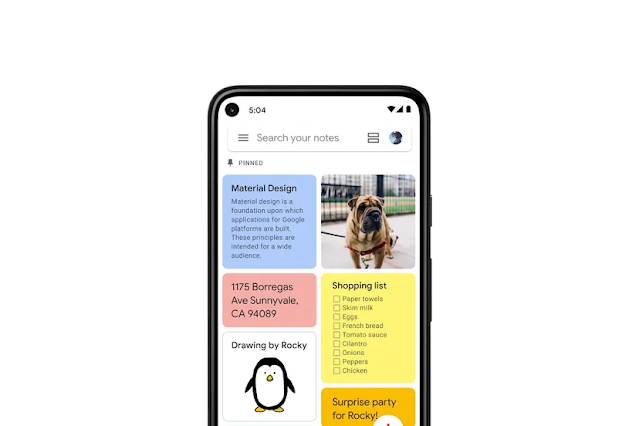
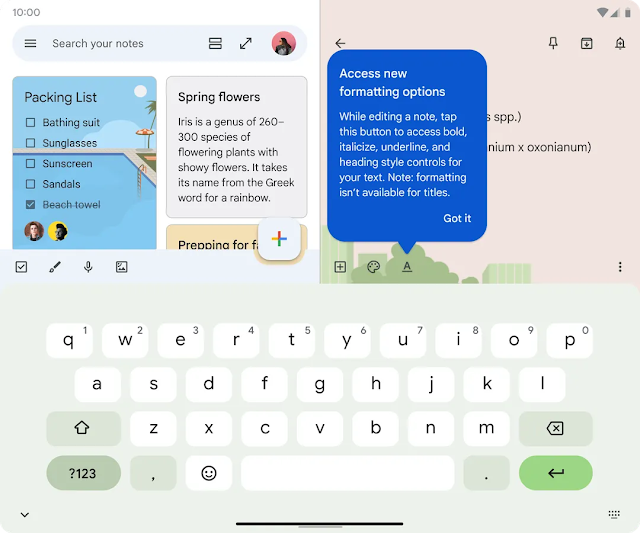
Google Keep for Android is getting new, long-awaited upgrades, mainly basic text formatting options like the ability to bold, italicize, underline, and transform text in notes. Users will, as a result, be able to customize their basic-looking notes into richer ones.


The current version of Google Keep

New formatting options in the app


Google Keep for Android is Getting Updated with New Formatting Tools


Mozilla has revealed in a recent blogpost that Firefox’s Android app will soon allow users to add a wide range of extensions on their Firefox browser, which is a part of the upcoming Android release.


The support is expected to be launched before the end of this year and will make Firefox the only major Android browser to support an “open extension ecosystem.”

Mozilla Announces New Firefox for Android Update: an ‘Open Extension Ecosystem’


Google might be developing a new connecting feature for Android that links Android devices signed into the same Google account. It could be used for switching between devices during calls, as well as sharing internet connection between devices more swiftly.


These features are similar to Apple’s Continuity features, including the company’s call-switching feature “iPhone Mobile Calls” that lets users attend calls from their Apple devices signed into the same Apple ID.


The speculated Android connecting feature, according to a preview shared by Android expert Mashal Rahman, will be found as the ‘Link Your Devices’ menu within the Devices & Sharing setting.


Google Seems to be Working on New Device-Linking Features for Android


PayPal announced a new log-in system ‘Passkeys’ some time back, and is now rolling it out on its website for Android users. The company also launched passkey support for Apple devices last year. To access Passkeys on PayPal’s website, users must have Chrome on Android 9 or above.


Switching your log-in system to Passkeys will not result in your password being removed from PayPal, as it would still be required to log in on unsupported devices. 

Android Users Can Now Log in to PayPal Using Passkeys


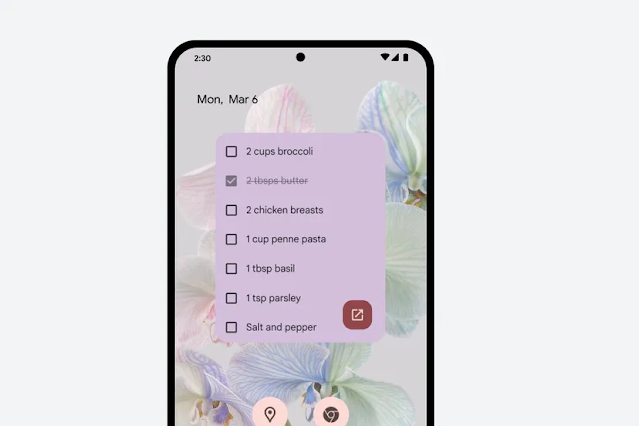
To make and manage to-do lists an easy task, Google is releasing a new widget for its ‘Keep’ app for Android devices. Using it, one can control their notes and lists directly on their home screen from a single note. Users can also pin multiple notes to their home screen using the Note Collection widget.


By selecting Single Note widget, you can choose the note you want on your home screen, while from the Note Collection widget, you can choose to display all notes, pinned notes, or notes under a certain label. Using the Single Note widget will also enable you to edit the note directly from your home screen, including checking / unchecking items off a list or altering text.


Google is Rolling Out a New, Interactive Widget of its Keep App


Microsoft’s AI chatbot Bing is being launched in a mobile app version for both iOS and Android. The functionality will work pretty much the same way as an app as it does on web.


After launching the revamped Bing two weeks ago, Microsoft quickly began receiving criticism from users over the bot responding with incorrect information and even insults. This led to updates including limited number of replies from the bot, and the option to choose from a variety of its tones.

Microsoft’s Digital Assistant ‘Bing’ is Now Available as an App and Skype Integration


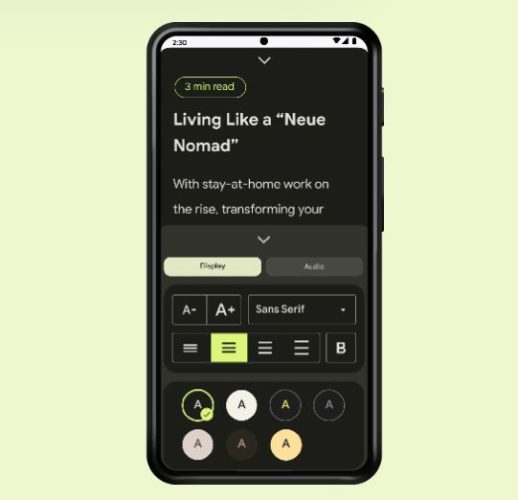
Android has announced several new updates for its smartphones and watches. These include a Reading Mode and tools that improve quality for Digital Car Keys, Google TV, and watchOS. Among the new features, the new Reading Mode is the most significant update, as it is designed to enhance accessibility and offers adjustable display and audio options without having the user be dependent on third-party apps.


Android’s Reading Mode can be separately installed from the Google Play Store. Once installed, users can customize their reading experience on their device according to their preference by playing around with the contrast, font type, and size. In addition to that, Reading Mode also offers a text-to-speech function with speed control, along with language support for English, French, Italian, and Spanish. Users can use Reading Mode across all Android apps, websites, as well as the Google Talkback screen reader.


Android’s Digital Car Keys function as a way to control one’s vehicle via actions like lock, unlock, and starting a compatible car, all by simply using a phone. New updates to the feature will now enable users to remotely share their digital key with people they trust, and view and control who has access to their vehicle from within the phone’s digital wallet app. The sharing is available for Pixel 6 and iPhone devices for now, until Android expands the rollout to other phone devices.

Android Announces New ‘Reading Mode’ and Updates for Digital Car Keys, Google TV, and watchOS

Subscribe Our Newsletter