Visualistan: Linkedin -->

    Social Items


Getting into the gaming business is a strategy digital content platforms tend to adopt for two reasons: one, as a way of keeping old users engaged with the platform and attracting new users; and two, for increasing revenue. LinkedIn has recently become one of these platforms too, with the launch of its own puzzle games.


The games are: ‘Pinpoint,’ ‘Crossclimb,’ and ‘Queens,’ and they are all available on LinkedIn on desktop as well as mobile. Each of these games can be played once in a day. They also show metrics like high score, daily streak, leaderboards, and people you know that have played them.


LinkedIn is Bringing Some Fun to its Platform with the Addition of Three Puzzle Games


LinkedIn is gradually altering the way Creator Mode works on its platform, while maintaining some of its existing elements as optional tools. Some of the Creator Mode options that LinkedIn has launched in the past include topical hashtags on profile, a ‘Featured’ section that showcase a user’s content, and a ‘Follow’ button on their profile.


In LinkedIn’s own words, it is working to open up “additional creation tool access and deeper analytics to all members.”


LinkedIn is starting off by shifting its focus off of ‘Talks About’ hashtags for connectivity and plans to remove the option of turning on Creator Mode from profile settings next. The Follow button will remain, and the ‘About’ section will be placed on the top of profiles, as before.

LinkedIn Seems to be Getting Rid of Creator Mode


LinkedIn is taking down its ad targeting option ‘Lookalike Audiences,’ preventing their creation and editing in ad development processes, starting the 29th of February.


With the help of Lookalike Audiences, advertisers could extract a list of customer information from their own database. LinkedIn’s system in turn could scan the list for different characteristics and match them with other similar and potentially interested users. The process has since been helpful to advertisers in specifically targeting people who match the profile of their existing customers.


Advertisers who have been relying on Lookalike Audiences would need to make changes to their active campaigns that are using the option. LinkedIn also adds that active campaigns using Lookalike Audiences “will continue to deliver using the static audience.”

LinkedIn Will No Longer Offer the Lookalike Audiences Ad Option

Harnessing Linkedin’s Professional Network For Growth #infographic

Explore this insightful guide to effectively promote your company on LinkedIn in 2024. Packed with valuable information, it offers essential tips and strategies for successful company promotion on the platform. Don't miss out on this valuable resource!


This informative visual guide by VizionOnline provides comprehensive insights into initiating your LinkedIn journey. It covers essential LinkedIn marketing strategies such as profile optimization, content creation, and effective networking. Additionally, it outlines daily, weekly, and yearly activities crucial for maximizing your LinkedIn presence. The guide also delves into advanced LinkedIn marketing tactics and poses thought-provoking questions for your strategic self-reflection.

Harnessing Linkedin’s Professional Network For Growth #infographic


LinkedIn has been integrating generative AI for different purposes across its platform – its latest AI product being “AI-powered coaching”, that is part of LinkedIn Learning.


This AI tool will assist users in their learning journey on LinkedIn, answering queries specific to their career and helping them improve the skills that their work requires. Initially, it will guide users on the topics of Leadership and Management and hopefully LinkedIn will bring more subjects to this experience.


According to one example shared by LinkedIn in its blogpost, users can explain to the AI-powered coaching a challenge they may be struggling with at work, in response to which, it will extract and present relevant information from the LinkedIn Learning library. The tool will additionally direct users to relevant courses, and provide suggestions, examples or necessary feedback customized according to the user’s work, career goals, and skills.


Alongside this AI integration, LinkedIn is also launching other products within LinkedIn Learning, including modules and course recommendations, while it is also expanding its Professional Certificates feature. 

LinkedIn Announces New Products as Part of LinkedIn Learning, Including AI-Powered Coaching


In a latest report by LinkedIn titled ‘Future of Work’, the company has shared insights and data on the impact of AI on different industries, as well as the advancing AI initiatives that LinkedIn is preparing to bring to its platform.


The report consists findings on the following topics: “Professionals’ conversations and sentiments towards AI,” ‘”Generative AI (GAI) by education, generation, and gender,” and “LinkedIn’s AI-assisted products will create more value for members and customers.”


LinkedIn has observed a 70% increase in conversations around AI on its platform, between December 2022 and September 2023. Around the world, members on the platform have been specifically having discussions around terms like “ChatGPT,” “Prompt Engineering,” “Prompt Crafting,” “Microsoft Copilot,” and “Generative Artificial Intelligence.” LinkedIn has further provided a percentage-breakdown of different populations that are driving these conversations.


Additionally, LinkedIn reports that 55% of its users “globally stand to see their jobs change to some degree by the rise of generative AI,” which highlights the impact of LinkedIn’s generative AI on the work industry.

LinkedIn Shares Key Insights into the Usage of AI Across its Platform and its Impact on Workforce


‘Collaborative Articles’ on LinkedIn is an AI-powered feature that uses AI-generated prompts as topics for discussions amongst users to share their expertise on them. The feature was first introduced on the platform in March and according to LinkedIn, has since been successful in facilitating more than a million expert contributions and driving overall traffic.


Users who contribute via Collaborative Articles also receive a ‘community top voice’ badge to highlight their skills and make their profiles stand out. The badge has been specifically significant in terms of driving traffic, as more people engage with the feature to in attempt to have the badge added to their profiles so they can show off their expertise.


LinkedIn is now changing the layout of the feature, which puts greater emphasis on users’ contributions than before and less focus on the AI prompts. As a result, contributors’ profiles will be highlighted at the top of Collaborative article posts.


LinkedIn Brings New Updates to its Latest Engagement Feature ‘Collaborative Articles’


LinkedIn has added a new search functionality within the Ad library, using which you can specifically find branded content partnerships. LinkedIn’s Ad library consists of database that is publicly available and contains information about advertisements on the platform.


More specifically, LinkedIn creators tagged with the Brand Partnership label will be discoverable through the new search feature. Users will be able to search for partnerships by entering keywords and refining their search using a filter for the date when the content was posted, including ‘Past 24 hours,’ ‘Past Week,’ and ‘Past Month.’ However, the feature does not offer the ability to directly search for sponsored content by a specific brand or advertiser, as of now.


LinkedIn Releases New ‘Brand Partnerships Search’ Functionality


LinkedIn is reportedly developing a new AI assistant / chatbot called ‘LinkedIn Coach,’ that is designed to help people search and apply for jobs, learn new skills, and expand their network on LinkedIn.


App researcher Nima Owji discovered the functionality on LinkedIn. Upon being inquired about the development, a LinkedIn spokesperson hinted at a confirmation, saying that the company is always exploring new ways and that more will be revealed soon.


Owji shared a preview of LinkedIn Coach, where a brief description of the bot is displayed, followed by a message that prompts a user to ask the bot a question. Below it is also a list of examples of questions.

LinkedIn is Reportedly Working on a New AI Assistant ‘LinkedIn Coach’


As AI technologies continue to be adopted by mainstream digital and social media platforms, AI-generated content is being seen all over the internet. LinkedIn is one of the platforms that hasn't stayed behind in the AI domain. Amongst its existing AI tools including AI-generated profile summaries, AI-assisted job descriptions, generative AI messages for job candidates, and an AI InMail assistant, the latest development is a post-generating feature. Discovered by app researchers some time ago, the tool is now being officially launched to users.


LinkedIn’s post generating tool will help users draft posts by prompting them to share their ideas within the composer, based on which it will generate suggestions. LinkedIn explains that it has created the functionality to simplify the process of writing full-fledged posts, which can get time consuming.


LinkedIn Launches New AI-Powered Post Generating Feature


LinkedIn is removing three of its existing features on the platform: carousel posts, profile videos, and the option of embedding clickable links within images or videos of posts. These haven’t been around for a long time, nor have they produced sufficient engagement; therefore their removal won’t cause much impact to users.


The company’s decision was formed after learning from user feedback that these elements in particular weren’t of much benefit to users including creators. “Starting June 26th, we’ll be removing these tools,” says LinkedIn. The platform has additionally assured users that their current carousel posts, profile videos, and linked images or videos will be viewable despite the termination of these features.


While carousel posts are a big hit on many social media platforms, they didn’t prove to be much successful on LinkedIn. Although prior to the release of carousel posts in July last year, many LinkedIn users had been using the PDF attachment option to makeshift carousel posts.


LinkedIn is Taking Down Three of its Creator-Focused Features 26 June Onwards


LinkedIn has launched a new DM engagement feature ‘Pages Messaging,’ that will allow Company Pages to send and receive DMs. People will be able to directly get in touch with companies via direct message, and Page admins will in turn be able to respond as the Page.


Up until now, the direct messaging functionality was only limited to LinkedIn members to interact with other members. However, seeing the rise in activity of Company Pages on LinkedIn, the platform decided to extend the DM functionality to companies, so people could engage with them directly.


Pages Messaging was first spotted last month on LinkedIn, and has since been available to selected users on the platform. The feature has now started to roll out to all users.

LinkedIn Makes it Possible for Users to Interact with Company Pages Via Direct Message and Vice Versa


A new element is making way to the ‘creator analytics and tools’ section on LinkedIn, created to provide topic and post prompts to help creators build their presence on the platform.


Creator analytics and tools are largely dedicated to content management and are available to users who have enabled the Creator Mode on LinkedIn. The dashboard was first launched last February and is still being rolled out to more users. It appears on the left side panel of the app for selected users.


Via Creator Mode, users can learn about how well their content is performing and reaching desired audiences. Additionally, users can view topics associated with their profiles to add to, and a listing of all the creator elements available to use in the app, such as LinkedIn Live, Newsletters, CTA links, etc.


LinkedIn is now adding a ‘conversations happening now’ feature to the Creator Mode, which provides post ideas that users may find relevant to their profiles and audiences. These samples are curated based on the content that one has posted previously as well as topics that one’s audience may be interested in. Users can choose to review these posts to gather necessary information and repost them with their own commentary as an input to the ongoing conversation.


On a whole, this addition is meant to give rise to more content on the platform by encouraging people to post more frequently. It also seems to be linked to LinkedIn’s new AI-generated posts feature, currently in testing.


AI-generated post drafts will make it pretty convenient for anyone to create content, although in essence, the functionality seems to contradict the idea of creators presenting their originality and authenticity on the platform. Combined with the new topic and post prompts, it could result in a large number of meaningless or sketchy posts. Nevertheless, it will give LinkedIn what it is intending to achieve: more conversations across the platform.

LinkedIn is Adding a ‘Topic and Post Prompts’ Feature to Creator Mode


After launching the ability to add AI-generated profile summaries and descriptions, LinkedIn seems to be testing another AI tool designed to generate feed posts.  


The prototype of the feature discovered by app researcher Nima Ojwi shows that the AI assistant prompts users to share ideas that it will then use to create a post draft.


LinkedIn is Reportedly Working on an AI Functionality that Generates Feed Posts


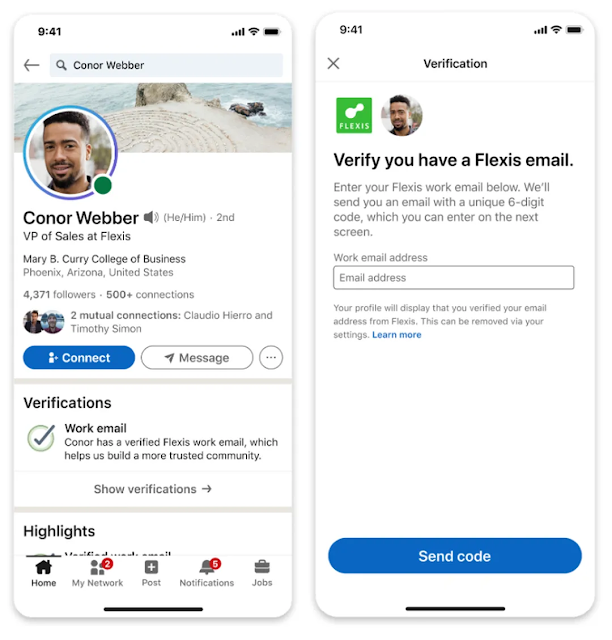
LinkedIn is launching a new verification system to enable users to verify their identity and workplace, and obtain free of cost digital workplace IDs as a result. Necessary information is collected through a user’s company-issued email address, CLEAR, or Microsoft’s Entra verified ID platform.


All verifications are represented with a green and blue check on users’ profiles. Moreover, if a user verifies their ID via CLEAR, then they can display the verification on their LinkedIn profile, authenticated by a US government-issued ID and US phone number.

LinkedIn Users Can Now Obtain Digital Workplace IDs for Free Via New Verification Program


LinkedIn has introduced a new messaging update to its platform that enables users to forward posts to multiple members at once.


When forwarding a post on LinkedIn, you can select more than one member to send it to. This can be done in two ways: by forwarding the post to each member separately or creating a new group chat with the selected members. Additionally, a typed message can be included with the post.

LinkedIn is Rolling Out the Option to Forward Posts to Multiple People at Once


LinkedIn is providing new visual elements in the Activity section starting from the next few weeks. As a result, users can display their activities in the form of images, videos, and articles in a more aesthetically pleasing and engaging format. This could also lead to improved opportunities for professional connections.

LinkedIn Introduces New Format for Activity Section and the Ability to Schedule Newsletters


LinkedIn has introduced a new addition to the Messaging tab recently, in the form of a ‘Focused Inbox’ display that divides into two tabs: Focused and Other. The ‘Focused’ tab will include more important messages while filtering out the less valuable ones to the ‘Other’ tab.


LinkedIn is Providing Users Better Messaging Experience Via New ‘Focused Inbox’


LinkedIn has announced new tools and insights that target fraudulent and scam content in the app. The new insights will provide useful information on LinkedIn accounts, a new feature is dedicated to detecting AI-generated profile images, and new prompts alert users about scam messages.


Profile insights reveal when a profile was created, last updated, and whether the user has a registered email or phone number in the app. This ‘About this profile’ feature is accessible from the three dots menu displayed on a profile and the information from it could help in detecting potential scammer accounts. The addition of this tool is an important one, especially because millions of fraudulent profiles have been recently identified on LinkedIn by MIT Technology. The fraudulent  accounts have been caught luring users into crypto investment scams in particular.


LinkedIn Announces New Tools Dedicated to Better Security for Users


LinkedIn has launched a new ‘Focused Inbox’ update with a dual-tabbed display to help users filter the junk content out in their inboxes. Users will have access to two tabs: Focused and Other. The less important or unwanted messages will be shifted to the Other tab in the message stream.


In LinkedIn’s words, “Your most relevant messages will appear on the Focused tab while the rest remain easily accessible on the Other tab. You can also easily move messages between the tabs.” LinkedIn also adds that the update will learn and improve over time from the way members use their inboxes.


LinkedIn is also bringing a new addition to the Jobs tab called ‘Jobs at your company,’ which will assist members in discovering existing opportunities within the company that they currently work at, such as newly listed roles. This would be especially helpful for employees that work at big companies where it is easier to miss out on internal promotions, simply due to not being aware of them.

LinkedIn Announces New Updates Including a Focused Inbox, New Analytics Features and More

Subscribe Our Newsletter