Visualistan: YouTube -->

    Social Items

5 Tips on How to Grow a YouTube Channel in 2025

Looking to grow your YouTube channel in 2025? Learn proven strategies to boost your views, subscribers, and engagement with this actionable guide tailored for today’s content creators. Video content accounts for around 82.5% of the internet traffic! This is a clear sign that video is now the preferred way people consume content on the internet. DIY tutorials, entertainment, & everything in between, viewers are choosing videos over blogs and articles.

That's why there's never been a better time to work on your YouTube Channel than today! So, in this guide, we will show you 5 tips on how to grow a YouTube channel in 2025. To fast-track your way to success, you can also grow YouTube channel with AIR Media-Tech like thousands of other creators.

5 Tips on How to Grow a YouTube Channel in 2025


YouTube has a bunch of new announcements: an update to YouTube Studio’s mobile app, expansion of Gift Memberships, and updated Product Tagging.


First off, the new YouTube Studio update will allow creators to make direct uploads from their camera roll to the app by tapping on the + icon in the app. Additionally, creators will be able to set their video monetization status during the upload process, hence making  content management more feasible.


Next, YouTube is experimenting with a new Community Posts feed in its mobile app for both iOS and Android devices. Community Posts has become a popular engagement feature where creators share text-based updates with their subscribers. Back in May of last year, YouTube made Community Posts available to all channels.

YouTube is Updating its Studio App, and Expanding Gift Memberships and Product Tagging


Last year in June, YouTube announced a new thumbnail testing and comparing option for creators to help them in their content creation process and ensure better performance. The option has since been in testing with about 50K different channels on YouTube in various regions.


Despite YouTube announcing that the Thumbnail A/B testing would roll out on a wider scale in 2024, there is no such news yet. However, vlogger Rene Ritchie, who also happens to be YouTube’s Creator Liaison, gave us a little update saying that the option will be available to all creators this year as soon as YouTube deems it suitable for a wider launch.

YouTube’s Thumbnail A/B Testing Option could be Arriving Any Time Soon


YouTube is experimenting with a new option called ‘Pause’ that can prevent new comments from being added on a video, while preserving the ones that were already posted.


This is different from the regular “turn off comments” option on YouTube which deactivates all comments, including the ones that have been posted under a video. Additionally, creators will be seeing three categories in their comment controls: “On”, “Pause”, and “Off”, among some additional sub-settings for comment moderation.


The new setting, however, is meant to give creators more control over how they can manage discussions around videos while turning off comments at a certain time in future. It can be particularly helpful in situations where a video is getting too much unwanted attention due to any reason.

YouTube is Testing a New Comment Moderation Setting that Turns off Future Comments on Videos


Community Posts, which is YouTube’s text-based social engagement feature closely resembling Twitter, is being integrated within the YouTube mobile app as a separate feed, also called as ‘posts only’ feed. This feed can be accessed from the Home tab in the app on mobile devices.


Since the integration is currently in the testing stage, only a select number of both Android and iOS users are a part of this experiment. On the Home tab, users will find a ‘view all’ button on single Community posts. Tapping on the button will display more posts, including those from channels that a user has engaged with in the past, as well as posts that YouTube thinks the user might like.

YouTube is Testing a New ‘Community Notes Feed’ in its Mobile App


YouTube has some new tools for creators on its platform, including generative AI features, a video editing app, an automatic dubbing option, and more - all to make content creation easier and more dynamic.


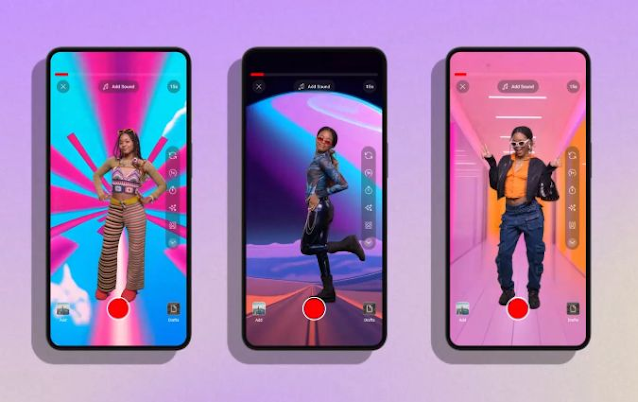
YouTube’s first generative AI feature ‘Dream Screen’ has been designed to generate image or video backgrounds that creators can add into their YouTube Shorts using basic text prompts. Another AI integration is an ideas generator that, as the name suggests, will provide creators with ideas based on simple prompts, by highlighting videos relevant to what they are looking for. Additionally, it will provide prompts on thematic content, as well as full-fledged content outlines.


However, one thing to note is that the ideas generator will provide recommendations based on existing or trending content, which is why the generated ideas may not seem unique as such. Regardless, the functionality could help creators design content that aligns with ongoing trends.  


YouTube Announces New Elements to Make Content Creation Easy, Including Generative AI Tools and a Video Editing App


YouTube is improving its ad controls that are meant to “optimize creator revenue” and make ad placement more effective. The new ad control options will be rolled out some time in November.


As a result of improved ad control, content creators on YouTube will no longer need to manually select ad formats (pre-roll, post-roll, skippable, and non-skippable ads), as YouTube will simplify the process by determining relevant ads for viewers. This will “both maximize revenue and ensure a positive viewing experience,” says YouTube.


It is important to note that over 90 percent of the videos on YouTube already have various ad options enabled by default, which means that most creators wouldn’t notice the update.


On the other side, since the update will result in mid-roll ads in some videos, many users may find it disruptive and annoying. The new ad control settings, however, will be applied on new uploads only, therefore the ad formats displayed in all previous videos will remain unchanged.

YouTube Announces New, Improved Ad Control Updates that Enhance Creator Revenue and Viewing Experience


YouTube is taking gaming content on its platform to another level by designing a whole dedicated section where users can actually play games directly. The feature, which is currently being tested with users, is called ‘Playables,’ available on YouTube on both desktop and mobile versions. The section is currently available to a select number of users, displayed on their home feed alongside other content.


The development of this feature was first reported back in June, although there isn’t much information revealed about the games included in it. One of the rumoured titles is called Stack Bounce, which has a simple gameplay. There will, however, likely be relatively complex games too, the probability of which is indicated by the option to save gaming progress.


YouTube is Testing In-App Gaming with a New Feature ‘Playables’


YouTube is enabling creators to add more external links, up to 14 of them, on their channel pages. This is going to help creators, artists, business owners, and other users enhance their presence on YouTube and extend their connections off-platform by drawing more traffic to their websites, product pages, and other social media profiles.


creators will also be able to customize the titles of their links. Moreover, links to other social platforms will show the relevant icons of the platforms in a pop-up display.


YouTube is also adding new tabs to channel profiles, such as “Courses” and “Releases” where one can mention the courses they have attended or products or music they have released. This too, will help strengthen one’s credibility and online presence by showcasing certain achievements.


The updated link display on YouTube channels will be accessible to all users by 23 August.

YouTube is Rolling Out Expanded Link Listing Display on Channel Pages


Launched initially for iOS devices in April, YouTube’s enhanced bitrate 1080p quality option for videos is now being expanded to desktop users, as a YouTube premium feature.


Enhanced bitrate is basically a more improved version of the 1080p HD resolution. While it doesn’t make a major difference to the quality of a video, it does add more clarity and crispness to the original 1080p quality, according to YouTube. Users could therefore enjoy a better viewing experience particularly with videos that contain more motion or details, like sports or gaming videos.


YouTube’s Latest Premium-Exclusive ‘Enhanced Bitrate’ 1080p Quality Option Rolls Out on Web


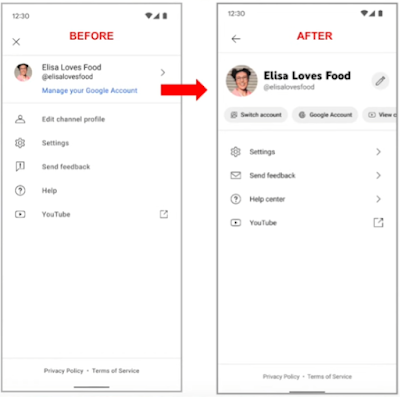
YouTube has updated Settings in YouTube Studio to make navigation of critical elements in the app more convenient. These include a modernized channel header, navigation chips like ‘switch account’ and ‘Google account,’ an updated Account Management section, and reorganization of Settings into categories that make them easier to access.


Editing channel banners and other channel information will be much easier now with the help of a new layout that will allow creators to make these changes from different surfaces in the app.


The newly added navigation chips will point to commonly used elements such as account switching and content management tools. The updated Account Management section on the other hand will simplify the process of managing channel access permissions and roles.

YouTube is Releasing an Improved Version of Settings in YouTube Studio, Including a New Layout


YouTube is experimenting with yet another interesting feature on its app, powered by AI. A new quiz option has been created to test users’ knowledge on various topics of their interest that they have explored on YouTube via educational videos. The functionality is also aimed at helping YouTube determine how well a video on its platform covers a given subject.


The quizzes, generated by AI, will appear on users’ YouTube Home feed, asking them questions relevant to the subject covered in a video that they recently watched. ”If you choose to take a quiz, a link to the recently watched video will appear under it so you can easily navigate back to learn more about the topic at hand,” adds YouTube.

YouTube is Testing a New ‘AI-Generated Quiz’ Functionality


YouTube is experimenting with a new discovery element “hyperlinked keywords in comments.” According to the company, this will help viewers learn more about certain topics or products mentioned in comments. In YouTube’s words, hyperlinked keywords will “reduce friction for viewers looking to discover new and relevant content on the platform.”


To put it simply, viewers will be able to search certain words or phrases that they come across in comments directly from YouTube, instead of having to pause their YouTube in-stream activity to search the word.


YouTube’s criterion for the selection of these words for hyperlinks is simple too: keywords that the platform determines as ones that “encourage exploration” will be hyperlinked.


When a user clicks on a hyperlinked word or phrase, a search results page for the hyperlinked text will open. In the meantime, if the user has played a video on YouTube, it will continue playing in the miniplayer.

YouTube is Testing ‘Hyperlinked Keywords,’ Created to Enhance In-App Discovery


YouTube has created a ‘Test & Compare’ feature; one of the platform’s most-requested tools, that is meant to help creators in their decision to pick thumbnails for their videos. The feature is currently in its initial phase of testing, hence available to a small number of creators.


The way Test & Compare works is that a creator uploads up to three thumbnails for a single video and the tool works with the thumbnail options using an A/B testing functionality. Following the completion of the test, the tool shows the user which thumbnail has more potential in terms of performance, based on its watch time.


YouTube Launches One of its Most Requested Features: Test & Compare

YouTube has a new policy against ad blocking that prevents users who use ad blockers from watching videos on the platform. According to the company, the policy is part of a new experiment and is therefore not applicable widely yet.


In a new pop up that appears to users who use ad blockers, YouTube explains that ads allow the platform to provide free content to people all over the world, therefore hinting that ad blocking is not favourable to the service. The platform suggests users to subscribe to its Premium offering if they want to avoid seeing ads, which will continue to benefit creators as they can earn from the subscriptions.

YouTube is Starting to Take Strict Measures Against Ad Blocking on its Platform


YouTube is introducing new AI-powered ad options associated with Shorts clips and trending music on the platform. The offerings specifically target Gen Z users and would help brands present their ad campaigns alongside music that’s trendy with this generation.


The ad solutions, called ‘Gen Z Music’ and ‘Trending Music on Shorts’, will be launched to advertisers in the coming months, as confirmed by YouTube.

YouTube to Launch New Ad Placement Options Surrounding Gen Z and Shorts Clips


YouTube is providing its Premium subscribers with an enhanced version of the 1080p HD video quality. It is meant to make videos that are heavy on detail and motion appear sharper. YouTube further clarified that the feature won’t be available for all videos, including Shorts, livestreams, and videos at resolutions higher or lower than 1080p.


While it may be hard to distinguish the regular 1080p resolution from 1080p Premium, the difference is technically in the latter being able to pack more information per pixel.

YouTube Announces New Perks for Premium Subscribers, Including More Enhanced 1080p Video Quality


After testing the option to add multi-language audio tracks in videos, YouTube is now expanding it to more creators.


The company has introduced multi-language dubs to help creators reach their audiences with enhanced accessibility. Moreover, it offers a simple way of reaching audiences with one video, instead of creating separate channels or videos.

YouTube is Expanding Multi-Language Dubbing to More Creators

The Top Most Visited Websites all over the World


According to some estimates, there are more than two billion websites in existence in 2023, but estimates vary.


If all these websites were to be ranked according to the traffic numbers they attract, a classic power law distribution would be seen. At the low end, the vast majority of these websites would be inactive, receiving little to no traffic. On the upper end of the ranking though, a handful of websites receive the lion’s share of internet traffic.


The infographic uses data from SimilarWeb, looks at the 50 websites that currently sit at the top of the ranking.


The Top Most Visited Websites all over the World #Infographic


YouTube’s ‘Go Live together’ feature that was first announced in November last year is now being rolled out. The feature allows for collaborative livestreaming between two users.



Creators that wish to invite guests for livestreaming must have at least 50 subscribers. This, however, is not a requirement for guests. Moreover, multiple guests can be rotated in the same livestream, but only one guest can be hosted at a time.

YouTube Releases its New Co-Streaming Functionality ‘Go Live Together’

Subscribe Our Newsletter