Visualistan: Google -->

    Social Items


Google is testing a new AI bot that makes conversations with people using their speech as input. The model was developed for the purpose of helping people practise a new language.


Google rolled out this conversational AI bot back in October of last year, but it was underdeveloped at the time as its capability was limited to providing feedback on spoken sentences. In the latest updated version, the bot can now help users practice having ongoing conversations in the language they are learning; although it currently only supports conversations in English.

Google Brings Out its Conversational AI Bot in Search Labs


A 2020 lawsuit put forth by Google account holders resulted in filing of a proposed class action settlement on Monday in a California federal court. The lawsuit accused Google of illegal tracking of users’ activity in Incognito mode. In the filed settlement, Google has therefore declared that it will destroy all the billions of records of web browsing data of its users collected from its private browser.


In addition to this, the proposed settlement requires Google to provide greater transparency regarding its data collection processes in Incognito mode and how the company will be putting limits on these processes in the future. Google will also need to de-identify any data that is not entirely deleted. Lastly, Google has also agreed to let users block third-party cookies by default in Incognito mode, so as to prevent tracking on outside websites as they browse privately.

Google Agrees to Destroy User Data Collected in Incognito Mode in a Proposed Settlement


Google is expanding its existing partnership with Reddit to acquire AI training data from the company that will help it adopt better ways to train AI models.


More specifically, as a result of the partnership, Google will be able to access Reddit’s data API that will bring its users real-time content from Reddit’s platform. This will facilitate users of Google’s products in participating in Reddit communities and conversations. In turn, Reddit will have access to Google’s AI-powered service ‘Vertex AI,’ which will help the company enhance its search capabilities.

Reddit is Providing Google with AI Training Data as Part of a New $60 Million Deal


Google is merging its AI products Bard and Duet into one product called Gemini. There is now a Gemini app for Android where the Bard chatbot and all Duet AI features in Google Workspace are available. In addition to that, Google’s largest and most efficient version of its large language model, the Gemini Ultra 1.0, is being released to the public.


Downloading the Gemini app will set Gemini (previously Bard) as your default assistant, replacing Google Assistant when you say, “Hey Google” or long-press the home button.  According to Sissie Hsiao, who runs Gemini at Google, the AI assistant is “conversational, multimodal, and more helpful than ever before.” Mostly, the changes that have been made to Bard are limited to the act of rebranding, so both the chatbot and AI features for Workspace will feel the same way that they previously have.


Gemini will work both as an AI assistant and chatbot, and could even be used in place of Search, as Google has added a toggle at the top of the app that lets you switch from Search to Gemini. This proves just how much faith Google has put into Gemini as it seems to consider it equally important as Search, which has been the most important product of the company.

Google Rebrands its Bard Assistant and Duet Features to a Single AI Product: ‘Gemini’


Google is bringing three new experimental generative AI features to Chrome in its latest version. Aimed at for enhancing browsing experience, the features will assist users in organizing their tabs, creating custom themes and writing on the web, according to Google.


In the next few days, the features will be available to users in the US first, on Mac devices and Windows PCs. Users can access them from the ‘Experimental AI’ tab in their Chrome Settings. “Because these features are early public experiments, they’ll be disabled for enterprise and educational accounts for now,” says Google.


Starting with Chrome’s AI Tab Organizer - it is developed to provide automatic suggestions and create tab groups based on a user’s open tabs. By right-clicking on a tab, you will find the ‘Organize Similar Tabs’ clicking on which will activate the option. “Chrome will even suggest names and emoji for these new groups so you can easily find them again when you need them next,” Google adds.


Check Out Google’s Latest Generative AI Features for Chrome, Including a Tab Organizer and More


Google is bringing a major change to Maps – users’ location history will now be stored locally on their devices instead of in the cloud. This is to prevent personal data from being accessible to law enforcement.


Law enforcement can collect data from tech companies on mobile phones that have passed through a certain area during a specific time, as a result of ‘geoface warrants.’ This makes anyone present at an alleged crime scene a potential suspect and puts all such people’s privacy at risk, hence the controversy around these warrants.


The update in Maps is specifically being applied within the Timeline feature, that keeps track of users’ location history and this information is stored in the Cloud. After the change, the data will instead be stored in users’ devices. Both Android and iOS users of Google Maps will receive a notification informing them about the update as it gradually rolls out.

Google to Prevent Users’ Data in Maps from Being Accessed by Law Enforcement

Fascinating Google Facts and Stats

Take a captivating ride through the digital cosmos with the exclusive infographic "Fascinating Google Facts and Stats" from digital information world. This visual delight serves as your VIP access to the extraordinary world of Google, unveiling mind-blowing statistics, remarkable milestones, and intriguing anecdotes that trace the tech giant's evolution.

Fascinating Google Facts and Stats #infographic


A latest feature in Google’s Bard chatbot is allowing users to receive responses to their questions in real time, meaning that you can see the answers as they are being generated. Previously, the answers could be viewed only once they were complete.


The real-time response generation option can also be turned off. Users can choose from ‘respond in real time’ and ‘respond when complete’ options from the icon in the top-right corner of Bard’s window. 


In addition to that, users will be able to cut off Bard while it is generating a response, if they wish to, with the help of a ‘skip response’ option. This would be useful when a user wants to type in another question without having to wait to receive the whole answer.

Google Brings New Features to Bard, Including Real-Time Generation of Responses


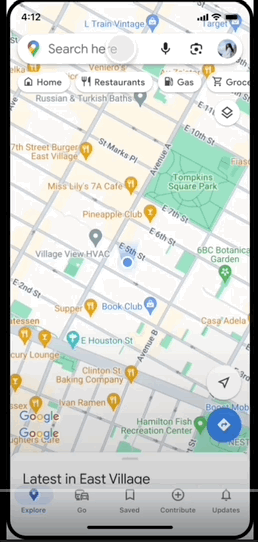
A set of new AI-powered features are coming to Maps, that mostly add to a more immersive navigation experience and improved search results in the app.


With these AI additions, Maps looks more like Google Search now, where users can enter a range of queries to search for spots and experiences they want to explore. Since Search also uses a number of AI features, it only makes sense why Maps is starting to follow the same path.


One of the ways that Maps is assisting in searching for places, experiences, or services with the help of AI is using the technology to analyze, in real-time, billions of existing photos uploaded by other users. People can ask the app specific questions, similar to the process in Search, and in return get a list of results for nearby places and services that match their queries.


Another generative AI integration in Maps is called ‘neural radiance fields,’ which filters through billions of images, including aerial photos, street imagery, and indoor snaps to create a 360-degree experience. This enables users to estimate the best time to reach their destination with the least amount of traffic.

Google is Bringing New AI-Powered Features to Maps, Including More Immersive Navigation

Which Brands Have the Most Loyal Customers?

Companies are always looking into new ways to learn more about their customers so that they can in turn increase their sales. The research team at Qualtrics has released a new infographic that looks at which brands have the most loyal customers out there, basing it on the top 25 brand keys loyalty leaders from 2019 to 2023.

Which Brands Have the Most Loyal Customers? #Infographic


Google’s gaming service ‘Google Play Games,’ that enables people to play Android games on PCs, is getting new updates. Prominent additions include support for 4K screen resolution on supported monitors and popular console gaming controllers, and console controller support for select, compatible games.


The 4K screen resolution will support higher-quality graphics so players can enjoy a more immersive gaming experience on their big screens. Players will also have the option to select a specific screen resolution from a variety of resolutions, that best suits their gameplay needs. Pressing the Shift and Tab keys together in any game will display a menu of all supported resolutions.

Google Announces New Features for the ‘Google Play Games’ Service on PC


Play Protect, Google’s malware protection system that prevents the spread of harmful and unwanted software on Android devices, has received a helpful new update. The system is now capable of detecting malicious apps as well as AI, that hide themselves by altering their identifiable features.


The nature of these malware agents, called as ‘polymorphic malware,’ makes them difficult to detect, specifically for Google’s existing systems. Play Protect’s new feature will recommend users a real-time app scan at the time of installing previously unscanned apps. Google will then provide the user with information on whether or not an app is potentially harmful, following a code-level evaluation.

Google Updates the Android Play Protect with a New, Enhanced Protection Feature


Google is experimenting with a new Discover Feed in the desktop homepage of its search engine, below the existing Search box. The feed will display recommended content based on a user’s interests detected from their web and app activity. The content in the feed will include categories of news headlines, weather forecasts, stock prices, and sports scores.


From the preview shared by a source, the interface of the Discover Feed appears to be somewhat similar to Microsoft’s News Feed in Bing. While Microsoft does allow its users with options of customizing their homepage and enabling or disabling the News Feed, apparently, Google’s Discover Feed will be present on all users’ desktop by default and can not be disabled.


Google to Integrate a New ‘Discover Feed’ Within its Desktop Homepage


Another leaked video of the Pixel 8 has recently surfaced, along with the camera specs of the phone and new AI integrations.


One of the AI specs that has been revealed is called ‘Magic Editor,’ that Google had earlier announced was going to be a part of select Pixel phones. The feature works by allowing users to tweak their photos to make them look however they like. For instance, a user could change the facial expressions of people in a photo, making them look like they are smiling. Magic Editor is also capable of moving subjects around in a photo, removing objects in a background, and even changing the lighting in an image.


Latest Google Pixel 8 Leaks Show New AI Photo Editing Tools and More


Google is getting closer to removing third-party cookies by making its Privacy Sandbox APIs generally available by default in Chrome, as a privacy-preserving alternative. The tech giant is expected to phase out third-party cookies by the end of 2024. 


As Google expands the availability of Privacy Sandbox APIs to all users over the coming months, it confirms that 3% of Chrome users will remain unaffected during the process.

Google Begins to Roll Out Privacy Sandbox APIs as it Gets Ready to Remove Third Party Cookies Next Year


Google’s latest 360-degree simulator of the Pixel 8 Pro shows what the device looks like from different angles; front, back, top, and bottom.


With the help of markers, you can also see where the device’s sensors and ports are located. One of the sensors is a temperature sensor on the back next to the camera lenses, which has been added to a Pixel phone for the first time. A a demo video explaining the sensor was also leaked previously but was later taken down.


The images from the simulator further confirms that the Pixel 8 is coming in three colors, namely black, pale blue, and a sandy porcelain.

Take a Look at Google’s Upcoming Pixel 8 Pro through a 360-Degree Simulator


Google has announced new Android features for Google apps and devices, aimed at improving productivity and connectivity. These include an updated AI assistant widget, photo import option in Google Wallet Pass, new communication apps in Android Auto, and an option to set up activity and sleep data in personal Routines.


Assistance at a Glance, the Android AI assistant, has been redesigned and updated to provide more useful information about events, travel, and local weather. The photo import tool in Wallet will make it easier to upload passes with barcodes and QR codes. Via Android Auto, users will now be able to join Zoom and Webex calls.


In addition to these updates, Android has gotten a new logo that appears closer to Google’s own logo. The most major differences are a capital ‘A’ in place of the small ‘a’ in ‘Android’ and the robot appearing in 3D.

Google Announces New Android Features and a Changed Android Logo


After being in testing for some time, Google’s latest AI chatbot ‘Duet AI’ is finally rolling out across all Workspace apps as a paid feature. The bot relies on machine learning to make things easy and creative within Workspace products, from producing emails in Gmail from text prompts to AI images, audio, and even video for presentations in Slides.


Within Google Sheets, Duet can convert raw data to insights and analysis and make charts out of the spreadsheet data. In Google Meet, it can generate new backgrounds, adjust lighting and sound, as well as generate meeting summaries. Within Google Chat, the bot can manage workflows by providing summaries of messages to simplify the work of skimming through long threads.


The most significant function of the tool seems to be helping users write text such as in emails. By doing so, the AI would not only save a user’s time, but also provide them with useful suggestions to make changes to or refine their text if needed, such as correcting grammar mistakes.

Google’s All-in-One AI Bot ‘Duet’ is Now Available on All Workspace Apps


Earlier this year, Google announced a new AI project called Project Tailwind, which it described as an AI notebook where people could interact with their notes and train the model based on their document entries. The project was later renamed to ‘NotebookLM’ and is currently available as a prototype.


While NotebookLM works as a standalone app for now, it could likely be later added as a Google Docs or Drive feature where it can assess and read users’ files.


To use NotebookLM, you first need to create a new project. The app then prompts you to add sources, based on which it generates a ‘Source Guide’ - a summary of the entire document, along with some key topics and relevant questions to ask. Since the app is still in its early stages of development, it accepts only up to five sources, with each source no more than 10,000 words long, otherwise the app stops responding.


Get to Know Google’s New AI Research Tool that you Can Train on your Personal Docs

Subscribe Our Newsletter