Visualistan: Gmail -->

    Social Items


Google is making the process of searching the most relevant emails in your Gmail inbox easier. The company has utilized machine learning to show users ‘top results’ when they search for an email in the app.


The results, according to Google, will be the most relevant to a user’s search. “We’re introducing a feature that helps you find exactly what you’re looking for with less effort,” explains the company in a recent blogpost.


To get search results that best match your query on Gmail, you simply need to type in relevant keywords in the search bar. The results will appear in a separate section named ‘top results’ at the top of the list, followed by results listed from most recent to oldest. Hopefully, the feature will resolve the problem of having trouble finding specific emails or files more quickly.
Google is Improving the Search Experience on the Gmail Mobile App


Since the past year, Google has made quite some changes to its office and communications software suite, Workspace. One of these changes includes a major one that the company recently announced, which is the redesigning of Gmail.


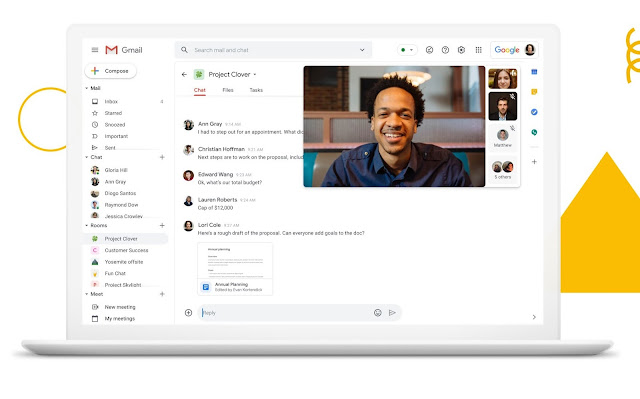
The redesigning of Gmail includes the option to “ring” a person with Google Meet, within the Gmail app. This means that users will be able to use Gmail for placing calls, and according to Google, the feature will come to the Meet app in the future too.


By placing greater emphasis on Gmail, Google seems to be showing how important of a service it is when it comes to the company’s Workspace. In a way, Gmail is now Google’s equivalent to Microsoft’s Outlook, as it has become a hub for multiple services like email, one-on-one chats, group chats, videoconferencing, and even calls now.


Google is also making it easier to find Spaces, Gmail’s group chat feature, by allowing users to search for it as an option, and also adding full support for threaded messages.

Google is Turning Gmail into A Multi-Service App

You can now directly save Gmail image attachments to Google Photos

Previously, you had to download the Gmail image attachments and upload them on Google Photos in order to create your backup but, with the release of a new feature. The electronic mailing giant company allows the users to save their Gmail image attachments directly to Google Photos without having to download them separately.


When you preview an image attachment on Gmail, on the upper-right corner of the menu will be present a new option “Save to Photos”. However, if you don’t want to even preview the image attachment, you can find the option right beside “Add to Drive”.

You can now directly save Gmail image attachments to Google Photos

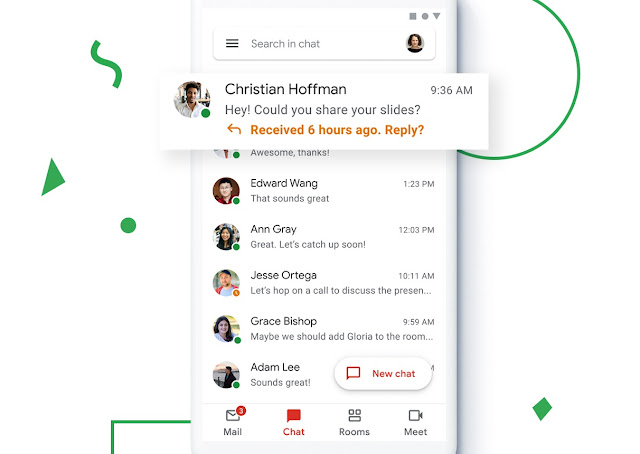
Gmail is launching Chat and Room tabs for all Google accounts

Google’s most widely used email service, Gmail is one of the most leading platforms to send and receive emails over the internet. From students to businessmen and general users, all have relied upon Gmail as the safest and most convenient emailing platform. However, Google rolled out Google Meet, Chat and Room tabs in the previous year which was available for the Google Suits users and Enterprise users only.

But now, the company is expanding the feature to be used by all Gmail users so that they can stay in touch with more people for a better collaboration for work projects. The main purpose of the integration of this feature into Gmail is that the company doesn’t want its Gmail users to keep switching between the tabs and therefore, you can now see four tabs on a single page of Gmail for easier switching.


Currently, the new tab feature will be available for Web and Android users and unfortunately, there are is no official news or reports regarding the launch of the feature for iOS devices. The four tabs that the web and android application users will see include, Google Mail, Meet, Chat and Rooms.
 

In order to activate the new four tabs features on your Gmail, the web and android users would have to follow the following steps.

For web users, the steps include:
  • Open settings and tap on All Settings
  • Select Chat and Meet as well as Google Chat option
  • Save the changes

For android application users, the steps are:
  • Go to the settings and select Personal Gmail account
  • Tap on General Settings
  • Select the Chat option and click on the Try it option

Gmail is launching Chat and Room tabs for all Google accounts


The Gmail app has a new widget for iOS 14, but it doesn’t offer much functionality. The only thing it offers is quick links to inbox, the compose menu, or search. This means that it doesn’t show a real preview of the inbox content, an option to archive or delete mails without opening the app, or a way to read an incoming message.  


The reason why the Gmail iOS 14 widget offers very limited options is because Apple has strict controls when it comes to iOS widgets – they are usually non-interactive. For instance, there is no way to check off to-do list items on a reminder widget or access the play and pause controls for Spotify or Apple Music widgets. 

Gmail Widget for iOS 14 Indicates a Common Problem with iOS Widgets

Google to let you opt-out of smart features

Google is a great search engine – the most powerful and the most popular search engine in the world right now. It is also a great platform with a range of extensive options giving you tons of flexibility to do tons of stuff. From its amazing Gmail mailing system to Google Meets, Google is a complete package for anyone and everyone.

However, with great power comes great responsibility, and Google is often accused of using or securing its users’ data without consent. That problem will be solved with the new feature that Google will be soon rolling out, which enables the user to turn off their Google data to offer smart features. Smart features from Google included Smart Compose and Smart Reply.

Google to let you opt-out of smart features

Google's G Suit Status Dashboard recently reported some service disruptions that occurred in several Google services including Gmail, Drive, Docs, Meet, Groups, Chat, Keep, and Voice. Google later reported that issues with Gmail had been resolved and that the service started to work normally as shown by its updated dashboard. 


The disruptions were, however, ongoing as file uploads were failing across Google services including uploading attachments in Gmail. Moreover, some users reported errors in composing a new email or reply. 

Google Services Affected by Ongoing Global Disruption


Google just updated its mobile G suite apps. Among the changes, a dark theme has been added for Docs, Sheets, and Slides. Moreover, Docs on mobile will now have Google's Smart Compose technology and Microsoft Office documents can now be edited without having to convert them. Users will be able to experience a vertical scrollable slide view in Slides and will also be able to respond to comments on their documents directly from Gmail.

The idea behind most of these new additions is to bring existing desktop features to smartphone; the way Google has been rolling out G Suite tools before.

The dark theme is likely to get a lot of user-attention as it has been awaited for a while now. According to Google, dark theme won't just be a relief for the eyes but will also help to save battery, hence making battery life last longer. 

G Suite Gets an Update for Mobile with Features Including Dark Mode and Smart Compose

Google Adds Google Meet Tab to Gmail


Google has recently announced that it is adding a new tab in Gmail dedicated to Google Meet. Thanks to this new introduction, Gmail users will not have to use a separate Google Meet app to participate in meetings as they can easily access Meet from a large tab in the main Gmail interface. Google has taken into account that many users might not like the huge bar at the bottom of their screens so it will also give them the choice to hide the Meet tab from the settings menu.

The tab will allow users to get meeting links, start a meeting, and an option to 'Join with a code.'

Given the rising demand for video chatting apps during the COVID -19 pandemic, Google made Meet available for free for users and soon added it to Gmail. In the upcoming days, the Meet tab will be available for all iOS and Android users through which they can join meetings quickly.

Even Google Calendar entries now have giant blue buttons for Meet as Google wasted no time integrating it with Gmail. Pairing the two is a big move against its competitors including Zoom. Zoom has been a popular choice for videoconferencing and both Google and Microsoft have been adding new features and shifting to free services to overtake the giant video chat app.


Google Adds Google Meet Tab to Gmail

Subscribe Our Newsletter