Visualistan: Google Maps. Technology -->

    Social Items


Google Maps Platform is the developer side of Google Maps, which is launching a new service that will cater to on-demand rides and delivery companies. The service will offer functionalities like finding nearby drivers, and sharing trip and order progress information with customers. 


Providing delivery solutions is something that Google Maps Platform had never focused on before, but because of the coronavirus pandemic, deliveries have become more widely used than before. Back in 2018, Google Maps Platform did offer a similar functionality, though: in-app navigation for ridesharing companies.  


The aim behind providing on-demand rides and delivery solutions is to help businesses improve their operations, and help drivers and customers transform their journey from booking to arrival or delivery, according to Google.  


Predictable pricing per completed trip will be shown to the user, Google senior product manager Eli Danziger added in the announcement. 

Google Maps is Providing Delivery Solutions with Google Maps Platform


Google recently announced that it is improving its Live View feature in Google Maps and is also making it available in additional transit scenarios. Live View in Maps uses the phone’s camera and GPS to show directions in augmented reality.  


The new addition to Live View in Maps will bring a landmark mode to the AR. By showing nearby landmarks, Maps will allow users to quickly and easily orient themselves and figure out their surroundings. The distance of the landmarks from the user’s current position will also be displayed, along with the directions to guide them to the landmarks. Landmarks will include easily recognizable places like local parks and tourist attractions.  

Google Maps’ Live View is Getting a Landmarks Feature

Google Maps published a a blogpost on Thursday on traffic and routing to explain to people how it identifies a massive traffic jam or determines the best route for a trip. 


While Maps can easily identify traffic conditions using the aggregate location data, the data still is not sufficient to predict what traffic will look like 10, 20, or 50 minutes into a user's journey. According to Google Maps, that's where technology really comes into play. To make such predictions, Maps analyzes historical traffic patterns for roads over time. The combined database of historical traffic patterns with live traffic conditions using machine learning helps generate predictions. 


Google Maps revealed that it recently partnered with DeepMind, an Alphabet AI research lab, to improve the accuracy of its traffic prediction capabilities. Maps also states that its predictions have been ''consistently accurate for over 97% of trips.''. By working with DeepMind, Maps has been able to cut the inaccuracy percentage even more and for that, it has used Graph Neural Networks, a machine learning architecture. The technology has helped make significant improvements in places like Berlin, Jakarta, São Paulo, Sydney, Tokyo, and Washington D.C.


Moreover, with the recent significant changes in traffic patterns around the world that the Coronavirus pandemic has brought, Google Maps has had to update its models to become more agile. 

Google Maps Explains its Technology Used to Predict Traffic and Determine Routes


Google is adding some small, new features to Maps that are focused on the app's Saved Tab. The Saved Tab lets users bookmark their favourite locations and categorize them into Favourites, Want To Go, Starred Places and custom lists. 


The updated Saved Tab will make it easier to sort locations if too many of them are saved. The Saved Tab will now sort recently saved places and locations that you are close to. Turning on the Google History in Maps will also make it easier to add places to the Saved Tab based on places you have previously been to. Moreover, all the locations that a user visits will now be saved on the Timeline feature. 

According to Google, the Maps insights are now organized by time, city, region or country. 

Google Maps' Saved Tab Gets New Features


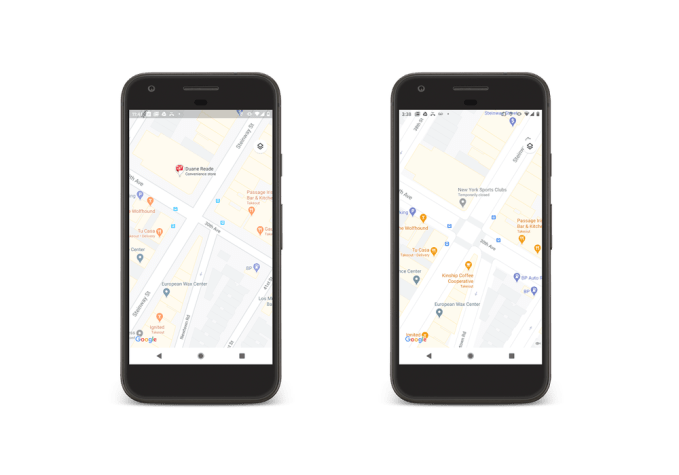
Google is updating Maps with new updates that include both natural features and city-level details. The visual reference will be made easier in the natural features as Google's computer vision techniques will color code the natural features after analyzing them from the satellite imagery. Moreover, certain cities including NYC, SF, and London will display more detailed street information, such as location of sidewalks, crosswalks, pedestrian islands, etc. 


The supported cities will also display the exact shape and width of a road to help users better analyze how wide or narrow a road or street is. All these enhanced details will make it easier for users to navigate cities on foot or modes of solo transportation like bikes and scooters. 

The updated city maps will not be making an appearance on Maps immediately, but Google says that the feature will be available for New York, London, and San Francisco in the coming months. Google also added that once the detailed city maps are made available to the three cities, the company will start rolling out this feature for other cities, including those out of the U.S.

Google Maps is being Updated with Detailed City-Level and Natural Features

Innovative Autonomous Cars of the Future

Have you ever been to one of those vintage car shows? Even if you haven't, you must have come across photographs of vintage cars from the past. They looked strong and robust, but they lack many of the luxurious options and features that we use in our technological devices today. We have watched our phones evolve from their simpler predecessors to more complex smartphones. The same is destined for automobiles.

Innovative Autonomous Cars of the Future #Infographic

Make Your Next Commute Better With Google Map's Latest Feature

In its most recent Android update, Google Maps has introduced a new feature that will allow users to manage YouTube Music during navigation without leaving the Maps app.

To use this feature, open Google Maps and go to Settings and tap on Navigation Settings where you will find Show Media Playback Controls, tap on it and a pop up will display different media apps on your phone. Among them tap on YouTube Music and tap Next. Remember that you'll need to have the YouTube Music app on your phone to use this feature.

Make Your Next Commute Better With Google Map's Latest Feature

Subscribe Our Newsletter