How Invoice Templates Fit Into a More Efficient Digital Document Workflow - Visualistan -->

    Social Items

Digital invoice workflow showing invoice templates, approval steps, eSignature, and document archiving on a computer screen.

Invoices may look like simple billing documents, but they often sit at the end of a much larger business process. A service has been completed, work has been approved, payment terms have been agreed, and someone now needs to issue an accurate document that can be reviewed, accepted, and stored. Using consistent Invoice Templates can make that process easier by giving businesses a repeatable structure instead of rebuilding every invoice from scratch.


This becomes particularly useful when invoices form part of a digital document workflow. Rather than treating billing, approval, electronic signatures, and recordkeeping as separate activities, businesses can manage them as connected steps. For freelancers and small companies, this can reduce repetitive administration, while larger teams benefit from more consistent documents and clearer approval records.


Why Standardized Invoice Templates Matter


The obvious benefit of an invoice template is that nobody has to recreate the same layout every time a bill is issued. In practice, though, consistency matters just as much as speed.


When several employees prepare invoices independently, small differences quickly appear. One person places payment terms at the top, another adds them at the bottom, while somebody else may forget a reference number entirely. A standard template gives everyone the same starting point.


Business details, customer information, invoice numbers, dates, line items, totals, payment terms, and internal references can all appear in predictable places. That makes invoices easier for both the sender and recipient to review. It is particularly useful for consultants, contractors, agencies, property businesses, professional services firms, and finance departments that issue similar documents regularly.
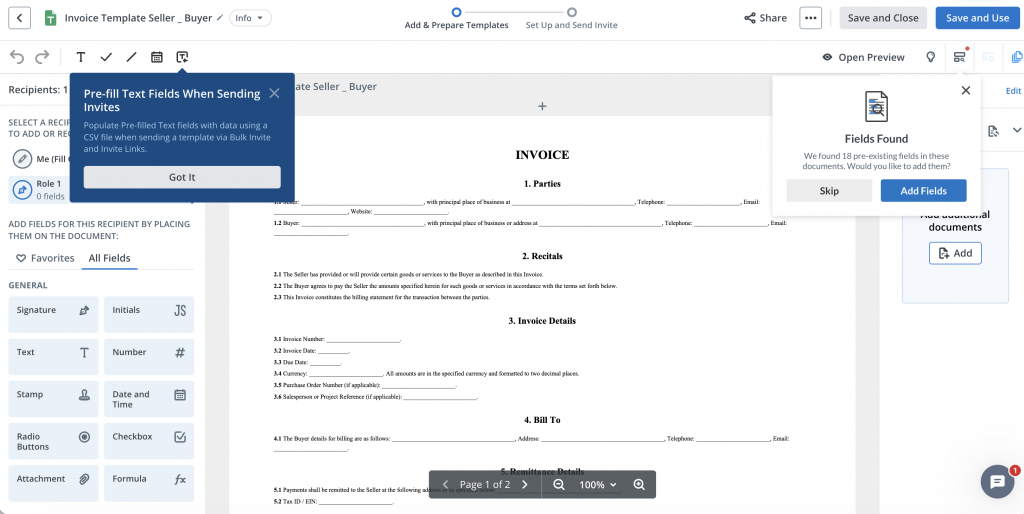
signNow invoice template editor showing an invoice with text, date and electronic signature fields
An invoice being prepared in the signNow editor with fillable document fields.

Moving From a Static Invoice to a Digital Workflow


Creating the invoice is only one part of the process. In many businesses, the document also needs to be checked internally, connected to completed work, approved by a manager, or retained alongside other signed records.


Consider a contractor carrying out maintenance work for a commercial property company. The contractor sends an invoice, but before finance can process it, the property manager needs to confirm that the work was actually completed. In another business, a department manager may need to approve an invoice before accounts payable releases payment.


When everything happens through ordinary email attachments, it is easy to end up with several versions of the same file.


A digital document workflow gives those steps a clearer structure. The invoice can be prepared consistently, routed to the relevant person where approval is required, and retained electronically once complete.


Not every invoice needs a signature. The useful question is whether there is a genuine approval, acknowledgement, or documentation requirement. eSignature should simplify that process rather than create an additional step for its own sake.


Where eSignatures Add Practical Value


Electronic signatures are most useful when a business needs documented agreement rather than simply sending information.


A professional services company, for example, might issue an invoice after completing an agreed project milestone. A contractor may need confirmation that a stage of work has been accepted. In real estate, maintenance or property-service invoices can pass through a property manager before reaching finance.


Healthcare organizations may also deal with documents that require controlled handling and approval. According to the verified information supplied for signNow, HIPAA support is available where a Business Associate Agreement is required.


The same principle applies in legal, finance, and HR environments. The value is not simply the ability to place an electronic signature on a page. It is having a defined record of who was expected to review, approve, or sign a document as it moved through the business.
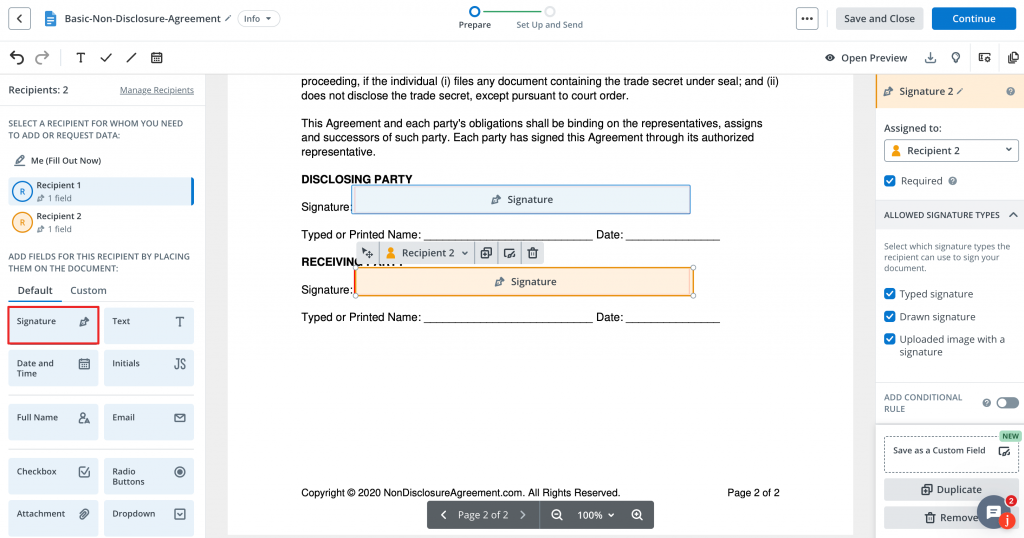

signNow document editor showing electronic signature fields assigned to different recipients
Signature fields can be assigned to specific recipients before a document is sent for eSignature.

What a Good Digital Invoice Process Looks Like


A reliable invoice workflow starts with accurate information, not with software.


Before an invoice is sent, the person preparing it should check the customer details, invoice number, invoice date, due date, description of goods or services, individual charges, total amount, and payment terms.


After that, the business should decide whether anybody needs to approve the document before it reaches the customer. For a freelancer, the process may simply involve preparing the invoice, checking it, sending it, and keeping the final copy.


For a larger organization, there may be additional stages involving project managers, department heads, procurement, or finance.


The aim should be one understandable process rather than several disconnected copies moving through inboxes and local folders. A document should move logically from preparation through any required approval, then to its recipient and finally into the organization's records.


Using Templates for Recurring Client Work


Templates become especially useful when a company bills the same customers repeatedly.


Take a marketing agency working with ten retained clients. The general structure of each invoice may remain almost identical every month while dates, project descriptions, hours, or charges change. Rebuilding that layout each time adds little value.


The same applies to a self-employed consultant, a maintenance company serving several properties, or a professional practice billing for recurring services.


The stable parts of the invoice can remain in place while transaction-specific details are updated. That also reduces accidental formatting changes and makes it less likely that somebody will leave out a standard field.


Clients benefit as well. When invoices follow a familiar structure, recipients know where to find totals, payment terms, invoice numbers, and reference information without having to interpret a new layout every time.


Security and Compliance in Electronic Document Workflows


Invoices often contain more information than people realize. They may include names, addresses, transaction details, payment terms, customer references, internal identifiers, and commercially sensitive information.


For that reason, moving invoices and related approval documents online should involve appropriate security controls.


Based on the verified information supplied for this article, signNow uses TLS 1.2 and TLS 1.3 for data in transit and AES-256 encryption for data at rest. The service also provides audit trails and two-factor authentication.


Its listed compliance coverage includes ESIGN, UETA, HIPAA where a BAA is required, SOC 2 Type II, GDPR, 21 CFR Part 11, PCI DSS, ISO 27001, CCPA, and eIDAS.


For U.S. businesses using electronic signatures, the ESIGN Act and UETA are particularly relevant legal frameworks. Organizations should still assess their own industry requirements and document-handling obligations rather than assuming that one compliance label covers every possible use case.


How Different Industries Use Digital Document Workflows


Real Estate


Property businesses regularly coordinate documents between landlords, tenants, contractors, property managers, and finance teams. A contractor invoice may need confirmation from the property manager before it can be processed. Keeping that approval within a structured electronic workflow makes it easier to identify the final approved version later.


Healthcare


Healthcare organizations have additional concerns around privacy and controlled access to documents. Where relevant, signNow supports HIPAA with a BAA required. Healthcare businesses still need to consider what information appears in each document and how their own internal procedures meet applicable requirements.


Finance


Finance teams tend to place particular importance on authorization and traceability. A clear document workflow makes it easier to understand who prepared a document, who reviewed it, and whether an approval step was completed before processing.


Legal Services


Legal practices may use invoices alongside engagement documents, approvals, or other client records. Keeping documents electronic can reduce unnecessary printing and scanning while providing a more organized record of the transaction.


HR


HR teams may not issue customer invoices, but they manage similar document processes every day. Onboarding forms, acknowledgements, internal approvals, and employment documents benefit from the same approach: consistent templates, clearly assigned responsibilities, secure handling, and an identifiable final version.


Reducing Administrative Work Without Losing Control


Digital workflows are most useful when they remove repetitive work without removing sensible checks.


There is little benefit in speeding up invoice creation if employees then spend time correcting missing information or trying to work out which attachment is the approved version.


According to the verified figures provided for signNow, users can save up to six hours per employee each week. The reported document completion rate is 80%, while signNow reports an average first-year ROI of 700%.


Those numbers should be considered in context rather than treated as guaranteed results for every business. The actual benefit will depend on document volume, the existing process, team size, and how extensively electronic workflows are used.


The wider lesson is that templates, approval responsibilities, eSign steps, and document storage work best when they are designed together rather than introduced as unrelated tools.


Why Audit Trails Matter


One of the practical advantages of a structured digital workflow is having a clearer history of what happened to a document.


This becomes useful when somebody asks a straightforward question months later: “Was this approved?”


With an informal email process, answering that question can involve searching several inboxes and comparing multiple attachments.


signNow includes audit trails among its verified security features. An audit trail supports recordkeeping by providing a history associated with the electronic document process.


It does not replace good internal controls, but it can make document activity easier to follow. If a contractor's invoice is connected to an approval or signed acknowledgement, retaining that information as part of the transaction can provide much more context than storing an isolated invoice file.


Managing Multi-Person Approval Workflows


Some invoices are simple, while others need to pass through several people before they are ready for processing.


A service provider might send a document to a project manager first, followed by an approver or finance contact. An HR document may need a manager's approval before reaching an employee. The exact workflow varies, but the underlying problem is the same: everyone needs to know when it is their turn to act.


A defined recipient order helps reduce manual forwarding and makes responsibilities clearer. This is particularly useful when the same approval sequence is repeated regularly.
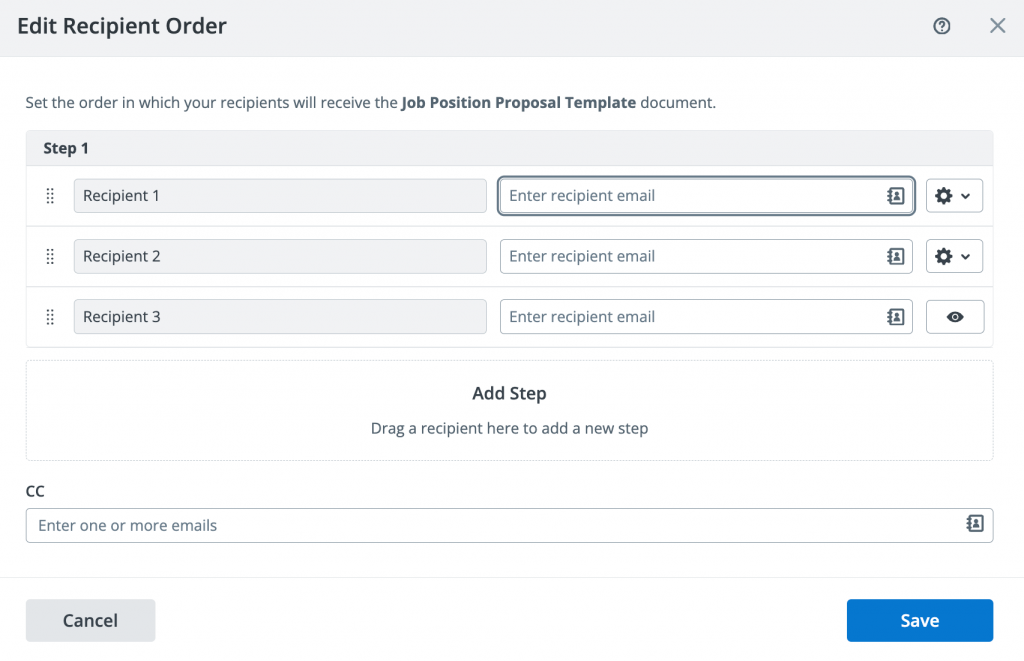

signNow Edit Recipient Order window showing several recipients and sequential document routing
signNow's recipient-order interface can be used to organize documents that need to move through several people.

Cost Considerations for Growing Teams


Document software costs can become more noticeable as the number of people using a system increases. That is why pricing should be considered alongside the actual workflow rather than judged only by the headline subscription figure.


Based on the pricing information provided for this article, signNow's Business plan starts at $8 per user per month when billed annually.


The supplied information also states that paid plans allow unlimited users and that signNow does not impose an envelope cap, compared with DocuSign's limit of 100 envelopes per user per year.


The more important question is how many people actually need access and how frequently they send documents. A lower price offers little benefit if the service does not fit the company's process. Equally, paying for unnecessary complexity can make a straightforward workflow harder rather than easier.


Building a Workflow People Will Actually Use


The most effective document process is usually the one employees can understand without having to read a lengthy manual.


Templates should be clear, fields should appear in a logical order, and responsibilities should be obvious. Employees should know who prepares a document, who approves it, who receives it, and where the completed version belongs.


Invoice workflows are a useful place to start because the process is familiar. Prepare the document, check the figures, obtain any necessary approval, send it to the relevant recipient, and retain the final version.


Once that process works consistently, the same approach can be applied to agreements, onboarding documents, authorization forms, and other records requiring electronic completion.


Technology is only part of the improvement. Much of the value comes from removing uncertainty around which template to use, who needs to act next, and which version should be treated as final.


Final Thoughts


Invoice templates solve a very ordinary business problem: the same type of document needs to be created repeatedly without introducing new errors each time.


Their value increases when they sit inside a sensible digital document workflow.


For simple transactions, that may mean creating an accurate invoice from a standard structure and keeping the final copy in the right place. For more involved transactions, the process may also include internal approval, eSignature, or documented acknowledgement.


The goal should not be to digitize every possible step simply because the technology exists. Businesses should focus on the points where employees repeatedly enter the same information, create duplicate files, chase approvals, or struggle to locate the final version.


That is where standard templates and electronic document workflows tend to provide the most practical benefit.


Frequently Asked Questions


What is an invoice template?


An invoice template is a reusable document structure containing the standard sections needed for billing. Instead of designing every invoice from scratch, a business keeps the layout consistent and changes details such as the client, invoice number, dates, goods or services, charges, and payment terms.


Does an invoice need an electronic signature?


Not necessarily. Many invoices are simply requests for payment and do not require signatures. An eSignature can be useful when an invoice is connected to approval, acknowledgement, work completion, or another process where the business needs a clearer documented record of agreement.


Are electronic signatures legally recognized in the United States?


Electronic signatures are generally recognized under the federal ESIGN Act, while UETA provides an important state-level framework for electronic transactions. The exact requirements can vary depending on the type of document, the parties involved, the industry, and other applicable legal obligations.


What information should an invoice template contain?


A practical invoice normally includes the seller and customer details, invoice number, invoice and due dates, a description of the goods or services supplied, relevant charges, the total amount due, and payment terms. Some businesses may require additional information based on their industry or internal procedures.


Why use an invoice template instead of creating every invoice separately?


A template keeps the document structure consistent and reduces repetitive formatting. It can also reduce the chance of staff forgetting commonly used fields. Templates are particularly useful for freelancers, contractors, agencies, professional services firms, and finance teams issuing similar invoices regularly.


How does an audit trail help with electronic documents?


An audit trail provides a record associated with activity on an electronic document. This can make it easier to understand what happened during an approval or signing process instead of relying only on email history. signNow includes audit trails among its verified security features.

How Invoice Templates Fit Into a More Efficient Digital Document Workflow

Digital invoice workflow showing invoice templates, approval steps, eSignature, and document archiving on a computer screen.

Invoices may look like simple billing documents, but they often sit at the end of a much larger business process. A service has been completed, work has been approved, payment terms have been agreed, and someone now needs to issue an accurate document that can be reviewed, accepted, and stored. Using consistent Invoice Templates can make that process easier by giving businesses a repeatable structure instead of rebuilding every invoice from scratch.


This becomes particularly useful when invoices form part of a digital document workflow. Rather than treating billing, approval, electronic signatures, and recordkeeping as separate activities, businesses can manage them as connected steps. For freelancers and small companies, this can reduce repetitive administration, while larger teams benefit from more consistent documents and clearer approval records.


Why Standardized Invoice Templates Matter


The obvious benefit of an invoice template is that nobody has to recreate the same layout every time a bill is issued. In practice, though, consistency matters just as much as speed.


When several employees prepare invoices independently, small differences quickly appear. One person places payment terms at the top, another adds them at the bottom, while somebody else may forget a reference number entirely. A standard template gives everyone the same starting point.


Business details, customer information, invoice numbers, dates, line items, totals, payment terms, and internal references can all appear in predictable places. That makes invoices easier for both the sender and recipient to review. It is particularly useful for consultants, contractors, agencies, property businesses, professional services firms, and finance departments that issue similar documents regularly.

signNow invoice template editor showing an invoice with text, date and electronic signature fields
An invoice being prepared in the signNow editor with fillable document fields.

Moving From a Static Invoice to a Digital Workflow


Creating the invoice is only one part of the process. In many businesses, the document also needs to be checked internally, connected to completed work, approved by a manager, or retained alongside other signed records.


Consider a contractor carrying out maintenance work for a commercial property company. The contractor sends an invoice, but before finance can process it, the property manager needs to confirm that the work was actually completed. In another business, a department manager may need to approve an invoice before accounts payable releases payment.


When everything happens through ordinary email attachments, it is easy to end up with several versions of the same file.


A digital document workflow gives those steps a clearer structure. The invoice can be prepared consistently, routed to the relevant person where approval is required, and retained electronically once complete.


Not every invoice needs a signature. The useful question is whether there is a genuine approval, acknowledgement, or documentation requirement. eSignature should simplify that process rather than create an additional step for its own sake.


Where eSignatures Add Practical Value


Electronic signatures are most useful when a business needs documented agreement rather than simply sending information.


A professional services company, for example, might issue an invoice after completing an agreed project milestone. A contractor may need confirmation that a stage of work has been accepted. In real estate, maintenance or property-service invoices can pass through a property manager before reaching finance.


Healthcare organizations may also deal with documents that require controlled handling and approval. According to the verified information supplied for signNow, HIPAA support is available where a Business Associate Agreement is required.


The same principle applies in legal, finance, and HR environments. The value is not simply the ability to place an electronic signature on a page. It is having a defined record of who was expected to review, approve, or sign a document as it moved through the business.


signNow document editor showing electronic signature fields assigned to different recipients
Signature fields can be assigned to specific recipients before a document is sent for eSignature.

What a Good Digital Invoice Process Looks Like


A reliable invoice workflow starts with accurate information, not with software.


Before an invoice is sent, the person preparing it should check the customer details, invoice number, invoice date, due date, description of goods or services, individual charges, total amount, and payment terms.


After that, the business should decide whether anybody needs to approve the document before it reaches the customer. For a freelancer, the process may simply involve preparing the invoice, checking it, sending it, and keeping the final copy.


For a larger organization, there may be additional stages involving project managers, department heads, procurement, or finance.


The aim should be one understandable process rather than several disconnected copies moving through inboxes and local folders. A document should move logically from preparation through any required approval, then to its recipient and finally into the organization's records.


Using Templates for Recurring Client Work


Templates become especially useful when a company bills the same customers repeatedly.


Take a marketing agency working with ten retained clients. The general structure of each invoice may remain almost identical every month while dates, project descriptions, hours, or charges change. Rebuilding that layout each time adds little value.


The same applies to a self-employed consultant, a maintenance company serving several properties, or a professional practice billing for recurring services.


The stable parts of the invoice can remain in place while transaction-specific details are updated. That also reduces accidental formatting changes and makes it less likely that somebody will leave out a standard field.


Clients benefit as well. When invoices follow a familiar structure, recipients know where to find totals, payment terms, invoice numbers, and reference information without having to interpret a new layout every time.


Security and Compliance in Electronic Document Workflows


Invoices often contain more information than people realize. They may include names, addresses, transaction details, payment terms, customer references, internal identifiers, and commercially sensitive information.


For that reason, moving invoices and related approval documents online should involve appropriate security controls.


Based on the verified information supplied for this article, signNow uses TLS 1.2 and TLS 1.3 for data in transit and AES-256 encryption for data at rest. The service also provides audit trails and two-factor authentication.


Its listed compliance coverage includes ESIGN, UETA, HIPAA where a BAA is required, SOC 2 Type II, GDPR, 21 CFR Part 11, PCI DSS, ISO 27001, CCPA, and eIDAS.


For U.S. businesses using electronic signatures, the ESIGN Act and UETA are particularly relevant legal frameworks. Organizations should still assess their own industry requirements and document-handling obligations rather than assuming that one compliance label covers every possible use case.


How Different Industries Use Digital Document Workflows


Real Estate


Property businesses regularly coordinate documents between landlords, tenants, contractors, property managers, and finance teams. A contractor invoice may need confirmation from the property manager before it can be processed. Keeping that approval within a structured electronic workflow makes it easier to identify the final approved version later.


Healthcare


Healthcare organizations have additional concerns around privacy and controlled access to documents. Where relevant, signNow supports HIPAA with a BAA required. Healthcare businesses still need to consider what information appears in each document and how their own internal procedures meet applicable requirements.


Finance


Finance teams tend to place particular importance on authorization and traceability. A clear document workflow makes it easier to understand who prepared a document, who reviewed it, and whether an approval step was completed before processing.


Legal Services


Legal practices may use invoices alongside engagement documents, approvals, or other client records. Keeping documents electronic can reduce unnecessary printing and scanning while providing a more organized record of the transaction.


HR


HR teams may not issue customer invoices, but they manage similar document processes every day. Onboarding forms, acknowledgements, internal approvals, and employment documents benefit from the same approach: consistent templates, clearly assigned responsibilities, secure handling, and an identifiable final version.


Reducing Administrative Work Without Losing Control


Digital workflows are most useful when they remove repetitive work without removing sensible checks.


There is little benefit in speeding up invoice creation if employees then spend time correcting missing information or trying to work out which attachment is the approved version.


According to the verified figures provided for signNow, users can save up to six hours per employee each week. The reported document completion rate is 80%, while signNow reports an average first-year ROI of 700%.


Those numbers should be considered in context rather than treated as guaranteed results for every business. The actual benefit will depend on document volume, the existing process, team size, and how extensively electronic workflows are used.


The wider lesson is that templates, approval responsibilities, eSign steps, and document storage work best when they are designed together rather than introduced as unrelated tools.


Why Audit Trails Matter


One of the practical advantages of a structured digital workflow is having a clearer history of what happened to a document.


This becomes useful when somebody asks a straightforward question months later: “Was this approved?”


With an informal email process, answering that question can involve searching several inboxes and comparing multiple attachments.


signNow includes audit trails among its verified security features. An audit trail supports recordkeeping by providing a history associated with the electronic document process.


It does not replace good internal controls, but it can make document activity easier to follow. If a contractor's invoice is connected to an approval or signed acknowledgement, retaining that information as part of the transaction can provide much more context than storing an isolated invoice file.


Managing Multi-Person Approval Workflows


Some invoices are simple, while others need to pass through several people before they are ready for processing.


A service provider might send a document to a project manager first, followed by an approver or finance contact. An HR document may need a manager's approval before reaching an employee. The exact workflow varies, but the underlying problem is the same: everyone needs to know when it is their turn to act.


A defined recipient order helps reduce manual forwarding and makes responsibilities clearer. This is particularly useful when the same approval sequence is repeated regularly.


signNow Edit Recipient Order window showing several recipients and sequential document routing
signNow's recipient-order interface can be used to organize documents that need to move through several people.

Cost Considerations for Growing Teams


Document software costs can become more noticeable as the number of people using a system increases. That is why pricing should be considered alongside the actual workflow rather than judged only by the headline subscription figure.


Based on the pricing information provided for this article, signNow's Business plan starts at $8 per user per month when billed annually.


The supplied information also states that paid plans allow unlimited users and that signNow does not impose an envelope cap, compared with DocuSign's limit of 100 envelopes per user per year.


The more important question is how many people actually need access and how frequently they send documents. A lower price offers little benefit if the service does not fit the company's process. Equally, paying for unnecessary complexity can make a straightforward workflow harder rather than easier.


Building a Workflow People Will Actually Use


The most effective document process is usually the one employees can understand without having to read a lengthy manual.


Templates should be clear, fields should appear in a logical order, and responsibilities should be obvious. Employees should know who prepares a document, who approves it, who receives it, and where the completed version belongs.


Invoice workflows are a useful place to start because the process is familiar. Prepare the document, check the figures, obtain any necessary approval, send it to the relevant recipient, and retain the final version.


Once that process works consistently, the same approach can be applied to agreements, onboarding documents, authorization forms, and other records requiring electronic completion.


Technology is only part of the improvement. Much of the value comes from removing uncertainty around which template to use, who needs to act next, and which version should be treated as final.


Final Thoughts


Invoice templates solve a very ordinary business problem: the same type of document needs to be created repeatedly without introducing new errors each time.


Their value increases when they sit inside a sensible digital document workflow.


For simple transactions, that may mean creating an accurate invoice from a standard structure and keeping the final copy in the right place. For more involved transactions, the process may also include internal approval, eSignature, or documented acknowledgement.


The goal should not be to digitize every possible step simply because the technology exists. Businesses should focus on the points where employees repeatedly enter the same information, create duplicate files, chase approvals, or struggle to locate the final version.


That is where standard templates and electronic document workflows tend to provide the most practical benefit.


Frequently Asked Questions


What is an invoice template?


An invoice template is a reusable document structure containing the standard sections needed for billing. Instead of designing every invoice from scratch, a business keeps the layout consistent and changes details such as the client, invoice number, dates, goods or services, charges, and payment terms.


Does an invoice need an electronic signature?


Not necessarily. Many invoices are simply requests for payment and do not require signatures. An eSignature can be useful when an invoice is connected to approval, acknowledgement, work completion, or another process where the business needs a clearer documented record of agreement.


Are electronic signatures legally recognized in the United States?


Electronic signatures are generally recognized under the federal ESIGN Act, while UETA provides an important state-level framework for electronic transactions. The exact requirements can vary depending on the type of document, the parties involved, the industry, and other applicable legal obligations.


What information should an invoice template contain?


A practical invoice normally includes the seller and customer details, invoice number, invoice and due dates, a description of the goods or services supplied, relevant charges, the total amount due, and payment terms. Some businesses may require additional information based on their industry or internal procedures.


Why use an invoice template instead of creating every invoice separately?


A template keeps the document structure consistent and reduces repetitive formatting. It can also reduce the chance of staff forgetting commonly used fields. Templates are particularly useful for freelancers, contractors, agencies, professional services firms, and finance teams issuing similar invoices regularly.


How does an audit trail help with electronic documents?


An audit trail provides a record associated with activity on an electronic document. This can make it easier to understand what happened during an approval or signing process instead of relying only on email history. signNow includes audit trails among its verified security features.

Related Post

Disqus Codes
  • To write a bold letter please use <strong></strong> or <b></b>
  • To write a italic letter please use <em></em> or <i></i>
  • To write a underline letter please use <u></u>
  • To write a strikethrought letter please use <strike></strike>
  • To write HTML code, please use <code></code> or <pre></pre> or <pre><code></code></pre>
    And use parse tool below to easy get the style.
Show Parser Box

strong em u strike
pre code pre code spoiler
embed

Subscribe Our Newsletter

Notifications

Disqus Logo